Tempo
v0.2.0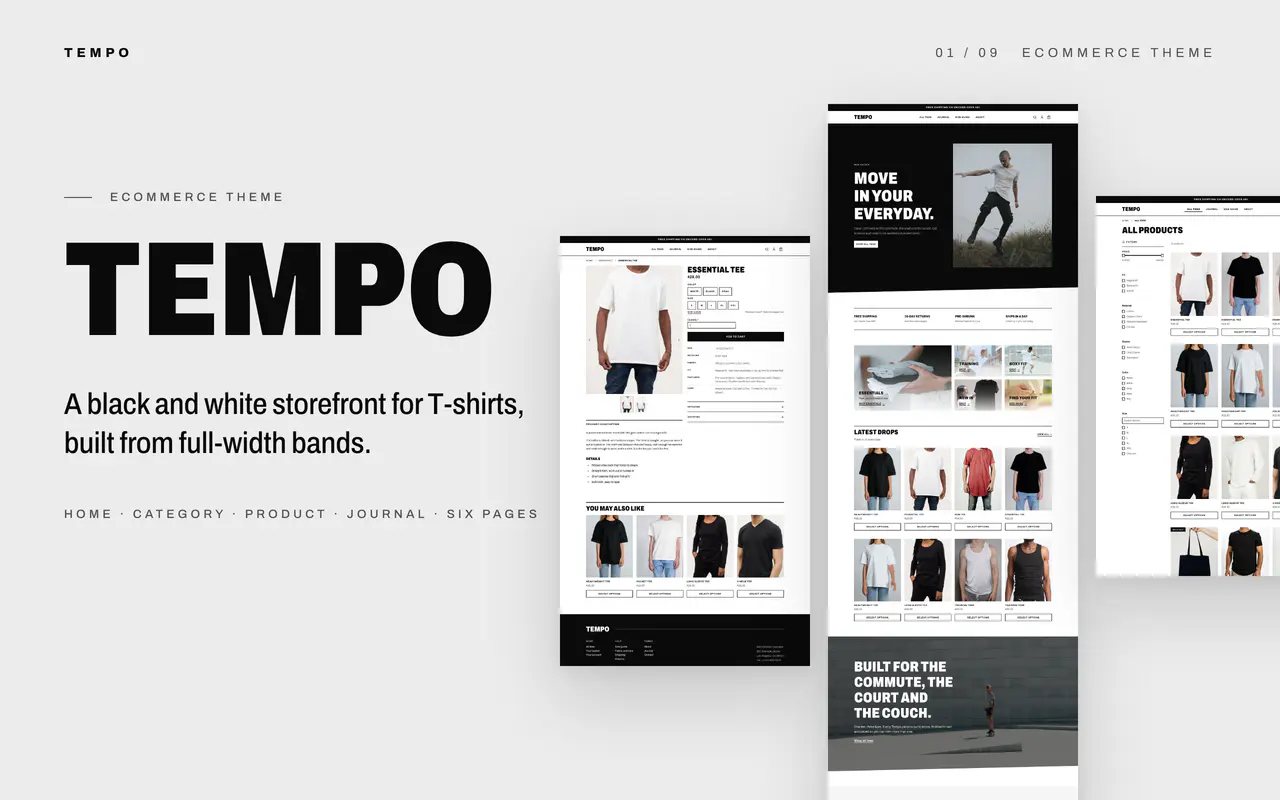
Overview
A bold black and white theme for T-shirt brands and basics shops. Heavy condensed capitals, 2px black rules and a home page built from full-width bands turn the volume up; the product pages stay clean, so the tee does the talking.
Tempo gives you a finished storefront in one step: a home page built from bands you can edit, six finished pages (About, Size guide, Fabric and care, Contact, Shipping and Returns), category pages with filters, a product page with size chips and a size guide, a journal and a black footer. Activate it, replace the demo photographs with your own, and you are selling.
Good for: T-shirt brands and basics shops: plain and heavyweight tees, pocket and long-sleeve tees, V-necks, tanks and training tops. It also suits other simple clothing that shoppers choose by fit, color and size, such as sweatshirts and hoodies.
What you get
- A loud, clean look. Archivo in two voices: heavy condensed capitals for headlines, product names and the wordmark, and a plain voice for reading. Black and white with no accent color: the button is black and turns white on hover. Square corners, 2px black rules and a slanted foot on the dark bands.
- A home page of full-width bands. A black hero band with the headline beside a photograph, four promises, a range grid with one large tile and four small ones, "Latest drops" (your newest products, four across), a statement band with one big line over a photograph, and a pale journal band.
- Filters shoppers expect. Price, fit, material, sleeve, color and size on every listing, beside a grid three across with sorting. Color and size are real variants: each color is a card of its own, and each size has its own stock.
- A product page for tees. Size chips as heavy squares, with a Size guide link and a fit tip beside them, then the buy box, Shipping and Returns rows, the spec rows (neckline, fabric, fit, features, care) and "You may also like".
- Six pages that are more than text. About, Size guide, Fabric and care and Contact open with a photograph and the page title; Shipping and Returns open on a black band. The words follow as labeled rows (the size chart and the fabric chart are lists your team can edit), and each page closes with the four promises, the newest tees, the journal or "Questions about orders".
- Everything in the page builder. Every band, text, shelf and list of questions is a widget you edit in the admin. The shipping and returns text, the size tip and the size guide link are shop fields on the admin's Store Setting page. No code needed.
- A journal. The blog is called "Journal" in the menu and on its own page, and the home page shows your three newest posts.
Requirements
- EverShop 2.3 or newer.
- In the admin, under Settings, Catalog, Product images, set the size to 1200 × 1600 (3:4, upright). The product cards and the gallery are drawn for this shape. The demo photographs show each tee worn against a plain light studio wall, cropped from below the face to the hips; your own look best shot the same way.
Install
On EverShop Cloud, choose Install on the item page. Tempo replaces your site's current theme.
On your own server, download the package from your order, then run this from your store's folder:
mkdir -p themes/tempo
tar -xzf evershop-theme-tempo-<version>.tgz -C themes/tempo --strip-components=1
npx evershop theme:active tempo
theme:active makes Tempo the active theme and installs its content: the home page bands, the header and footer menus, the six pages and the shop fields you edit in the admin. Add --dry-run first to see what it would change. It then offers to run the build; restart your store afterwards.
Installing the theme never creates products. Your catalog stays yours.
Demo content (optional)
To see the theme with a set of tees, activate Tempo first, then load the demo data:
npx evershop seed --attributes --categories --collections --products --pages --blogIt adds a T-shirt catalog of 9 designs in 15 colorways (71 products with their sizes), its attributes (fit, material, sleeve, neckline, color, size, fabric, care and more), two categories (Essentials and Training), 5 content pages and 3 journal posts. Running it again skips products that already exist. The theme installs its own widgets, so leave --widgets out.
Good to know
- The photographs are stand-ins. The home page's pictures, the page banners and the demo catalog's product shots are free Unsplash and Pexels photographs: tees worn against a studio wall with the faces cropped out, and people on the move in the banners. No brand can be read in them. They are there so the theme looks finished the moment you install it. Replace them with your own in the page builder and on your products before you open the store.
- The links go to your whole catalog at first. The menu's "All tees" and the range tiles (Essentials, Training, Boxy fit, New in) open the product listing, because a category's address exists only once you create it. Point them at your own categories in the page builder.
- Set the size guide link once. The link next to the size chips appears when you enter the Size guide page's address on the admin's Store Setting page. The theme cannot fill it in, because the page's address is chosen when the theme is installed.
- Two links inside the page texts show as plain words: About's link to the Size guide and Shipping's link to Returns. EverShop does not turn a page link inside text into an address. Once you know the pages' addresses, add the links in the page builder.
- With the demo data, five pages exist twice: the theme's designed page and a plain copy under
/page/, which the demo journal posts link to. Delete the copies when you replace the demo posts. - "Latest drops" shows your newest products, not chosen ones.
- A dark band needs black or a photograph. Paint a band with the theme's black (#0A0A0A) or lay it over a photograph and its text turns white. Any other dark color keeps dark text.
- The footer reads your store settings: the store's email, phone and address. A field you leave empty is not shown.
- No sale prices or color swatches. EverShop has no special price, and its color choices are text chips.
- No newsletter. EverShop has no subscription service.
Fonts
Archivo (SIL Open Font License) is included and served from your own store: Latin, Latin Extended and Vietnamese.
Highlights
Good for
T-shirt brands and basics shops: plain and heavyweight tees, long sleeves, tanks and training tops. It also suits other simple clothing sold by fit, color and size.
Black and white, turned up
Heavy condensed capitals and 2px black rules. The home page is a stack of full-width bands: a black hero, four promises, a range grid, Latest drops, a photo band and the journal.
Edit it all in the page builder
The home page and six ready pages (About, Size guide, Fabric and care, Contact, Shipping, Returns) are page builder widgets: photo bands, text, shelves and FAQs. No code.
Filters and a size guide
Filter by price, fit, material, sleeve, color and size. Color and size are real variants, and the size chips sit beside a Size guide link and a fit tip you set in the admin.
Demo store in one step
Optional seed data: 9 designs in 15 colorways (71 products with sizes) in Essentials and Training, plus attributes, 5 pages and 3 journal posts. 44 photos included.
Requirements
Requires EverShop 2.3.0 or later. Set Settings › Catalog › Product images to 1200 × 1600 px (3:4, portrait).
What's included
- Home page
- Category page
- Product page
- Contact page
- Blog & articles
- Landing pages
- Page builder
- Product filters (layered navigation)
- Demo seed data
Be the first to review this product
Write a review
Please log in to share your review of this product.
Changelog
- Photographs are included: free Unsplash and Pexels photographs for the hero, the five range tiles, the statement band, the page banners, the three journal covers and every demo product (two each, the tee worn against a light studio wall). A store that installs the theme no longer shows empty banners.
- Six pages are installed with the theme: About, Size guide, Fabric and care, Shipping and Returns now come with Contact (before, only the demo data added them). About, Size guide, Fabric and care and Contact open with a photo band and their title, Shipping and Returns with a black band. The text reads as labeled rows, and each page closes with the four promises, the newest tees, the journal or a new "Questions about orders" list.
- The size chart and the fabric chart are lists instead of HTML tables, so you can edit them in the admin's text editor.
- Every link works on a store without the demo data. The menu is All tees, Journal, Size guide and About: the Essentials, Training and Graphic links are gone, because a category exists only where the demo data was loaded. The range tiles (Essentials, Training, Boxy fit, New in) and the statement band open All tees.
- The size guide link next to the size chips has no default address any more (it was `/page/size-guide`, which only the demo data creates). Enter your Size guide page's address on the admin's Store Setting page to show it.
- The range grid's Graphic tile is now "Boxy fit" (the heavyweight tees).
- Demo catalog: 9 designs in 15 colorways (71 products with their sizes), in two ranges, Essentials and Training. The Graphic range, the black Pocket tee, the white V-neck tee and the gray Training tee are gone (no free photograph fits them), and the product descriptions match their photographs.
- To upgrade a store from 0.1.0 on your own server, run `npx evershop theme:active tempo --dry-run` to see what will change, then run it again without `--dry-run`.
Tempo
v0.2.0A bold black and white EverShop theme for T-shirt brands and basics shops: full-width bands, size chips with a size guide, fit filters and demo data.
From$9.00/mo
| Lifetime orders | Monthly price |
|---|---|
| Up to 100 orders | $9.00/mo |
| Beyond 100 ordersmaximum | $15.00/mo |
Up to $15.00/mo — the maximum.
One-click install to your EverShop Cloud site
Self-hosted
Buy once and download the theme for your own EverShop installation.
$180.00 one-time
Download from your orders after payment — always the latest version.
- Version
- 0.2.0
- Last updated
- 2026-11-15
- Category
- Themes
- Type
- Theme
- Compatibility
- EverShop 2.x
- Package
- @evershop-theme/tempo