Patina
v0.2.1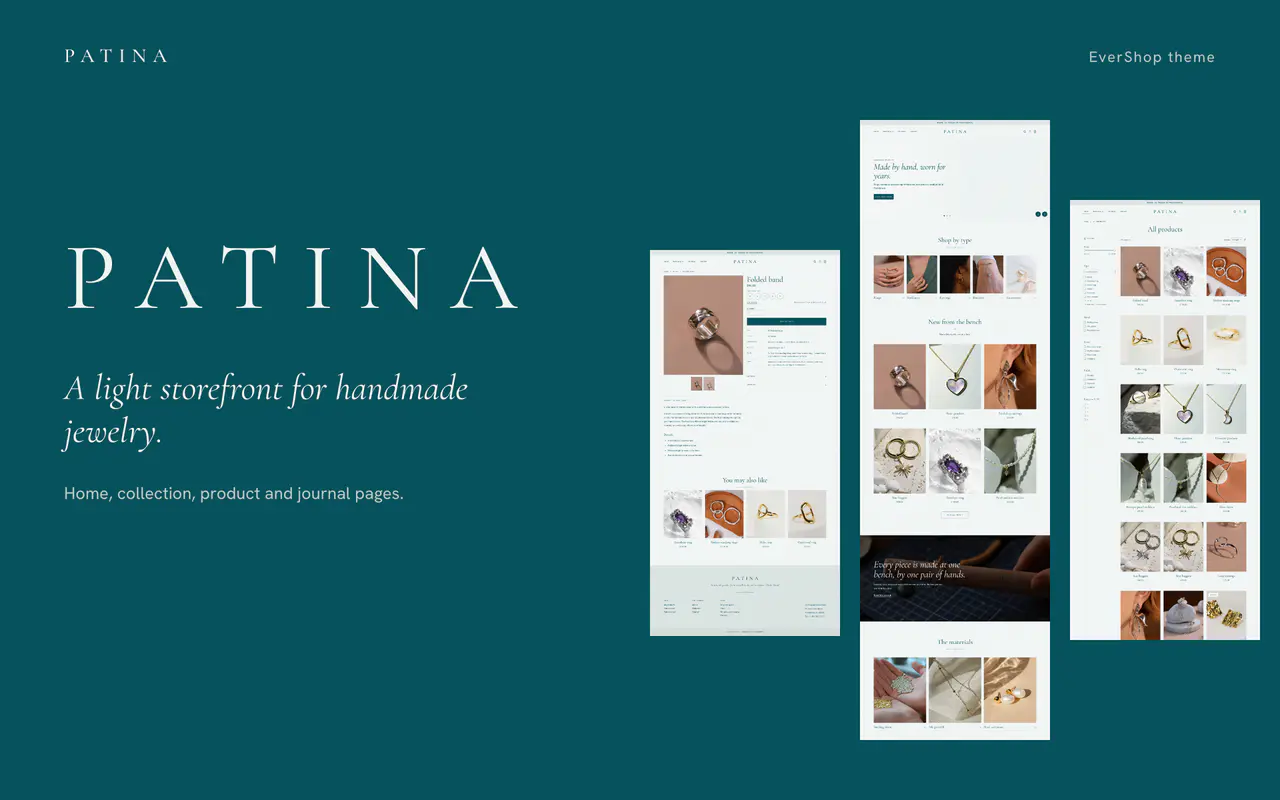
Overview
A light, quiet theme for shops that sell handmade jewelry: rings, necklaces, earrings, bracelets and a few small accessories. The photographs are the product, so everything else steps back: a near-white page, one deep teal, refined type, generous space and almost no chrome.
Patina gives you a finished storefront in one step: a home page built from sections you can edit, six finished pages (About, Our materials, Ring size guide, Jewelry care, Shipping and returns, and Contact), category pages with filters, a product page with ring sizes and a size guide, a journal, and a footer with your wordmark, tagline and contact details. Activate it, replace the demo photographs with your own, and you are selling.
Good for: jewelry studios and small makers selling rings, necklaces, earrings, bracelets and hair accessories in silver, gold-fill and pearl. It also suits other small pieces that shoppers choose by a close-up photograph.
What you get
- A first screen of light photographs. A full-width slideshow of three slides under the wordmark and the menu, the headline in an italic serif and a button, always at the left and always in teal. On a phone each slide shows its own upright picture, with the words at the foot.
- Your types at a glance. "Shop by type": five 4:5 close-ups with their names below, then "New from the bench", your six newest pieces three across.
- Quiet product cards. A photograph, a name in the serif and a price, with no Add to Cart button: a piece is looked at and then opened, because its ring size or metal has to be chosen. A "Sold out" label sits on the photograph when a piece is gone.
- A band for the bench and the materials. A quotation over a photograph of a jeweler's bench, then three close-ups that open your Materials page.
- Filters shoppers expect. Price, type, metal, stone, finish and ring size on every listing.
- Six pages that look finished. About, Our materials and Jewelry care open on a light photograph with the title at the left; Ring size guide, Shipping and returns and Contact open on a pale band with three short facts. The text sits in rows, heading on the left and words on the right, and each page ends with a FAQ, your newest pieces, the materials or the journal.
- A product page for jewelry. Large photographs, ring sizes as circles with a Size guide link and a tip, spec rows (finish, dimensions, weight, how it is made, care), Shipping and Returns rows, and "You may also like".
- Everything in the page builder. Every section is a widget you edit in the admin: slides, bands, text, tiles, product shelves and the contact form. The footer tagline, the shipping and returns text, the size tip and the size guide link are shop fields. No code needed.
- A journal. Your newest three posts close the home page, and the blog is called "Journal" in the menu and on its own page.
Requirements
- EverShop 2.3 or newer.
- In the admin, under Settings, Catalog, Product images, set the size to 1200 × 1500 (4:5 portrait). The product cards and the gallery are drawn for this shape.
- Product photographs are opaque close-ups, not cut-outs: the surface a piece lies on is part of the picture. Shoot them 4:5, at least 1280 × 1600. The first photograph is the whole piece and becomes the card; the second is a closer look at the material.
Install
On EverShop Cloud, choose Install on the item page. Patina replaces your site's current theme.
On your own server, download the package from your order, then run this from your store's folder:
mkdir -p themes/patina
tar -xzf evershop-theme-patina-<version>.tgz -C themes/patina --strip-components=1
npx evershop theme:active patina
theme:active makes Patina the active theme and installs its content: the home page sections, the header and footer menus, the six pages, and the fields you edit in the admin. Add --dry-run first to see what it would change. It then offers to run the build; restart your store afterwards.
Installing the theme never creates products. Your catalog stays yours.
Demo content (optional)
To see the theme with a set of pieces, activate Patina first, then load the demo data:
npx evershop seed --attributes --categories --collections --products --pages --blogIt adds a jewelry catalog of 24 pieces (53 products with the ring sizes), its attributes (type, metal, stone, finish, ring size, dimensions, weight, how it is made and care), five categories (Rings, Necklaces, Earrings, Bracelets and Accessories), 5 content pages and 3 journal posts, with their photographs. Running it again skips products that already exist. The theme installs its own widgets, so leave --widgets out.
Good to know
- The photographs are stand-ins. The slides, the tiles, the bench band, the pages' banners and the demo catalog's product shots are free Unsplash and Pexels photographs of real pieces by other makers. They are not your products. They are there so the theme looks finished the moment you install it. Replace them with your own in the page builder and on your products before you open the store.
- The links go to your whole catalog at first. "Shop", the slides' first button and the type tiles open the product listing, because a category's address exists only once you create it. Point them at your own categories in the page builder.
- "New from the bench" shows your newest products, not chosen ones.
- The slideshow keeps its words at the left on every slide, over a soft wash of the page colour, so choose photographs whose left side is calm. A slide can still set its words at the top, middle or bottom.
- Write your Shipping and Returns rows and your size guide link. The rows on the product page read shop fields the theme adds. A row you leave empty is not shown, and the size guide link appears once you enter the address of your Ring size guide page.
- Each metal is a card of its own. A piece made in two metals is two cards with the same name; the photograph says which is which.
- A dark band needs the theme's teal or a photograph. Paint a band with the teal (#06525C) or lay it over a photograph and its text turns light. Any other dark colour keeps dark text.
- Left out because EverShop cannot do it yet: sale prices, metal swatches and a newsletter. Payment marks are hidden in the footer.
- The journal says "Blog" in three places a theme cannot reach: the breadcrumb, the page title and the "Back to blog" link on a post.
Fonts
Cormorant Garamond and Hanken Grotesk (SIL Open Font License) are included and served from your own store: Latin, Latin Extended and Vietnamese.
Highlights
Good for
Jewelry studios and small makers selling rings, necklaces, earrings, bracelets and hair accessories in silver, gold-fill and pearl, and other small pieces sold by their close-up photographs.
Light, so the pieces show
A slideshow of three light photographs, five 4:5 type tiles, the newest pieces, a bench band, three material close-ups and the journal. A near-white page and one deep teal.
Edit it all in the page builder
The home page and six ready pages (About, Our materials, Ring size guide, Jewelry care, Shipping and returns, Contact) are page builder widgets: slides, bands, text and tiles. No code.
Filters, metals and ring sizes
Layered navigation on every listing: price, type, metal, stone, finish and ring size. Ring sizes US 5 to 9 as circles, with a size guide link and a tip in the buy box.
Demo store in one step
Optional seed data: 24 pieces (53 products with the ring sizes) in Rings, Necklaces, Earrings, Bracelets and Accessories, plus attributes, 3 posts, 5 pages and 72 demo photos.
Requirements
Requires EverShop 2.3.0 or later. Set Settings › Catalog › Product images to 1200 × 1500 px (4:5 portrait), the shape the cards and the product gallery are drawn for.
What's included
- Home page
- Category page
- Product page
- Blog & articles
- Landing pages
- Contact page
- Page builder
- Product filters (layered navigation)
- Demo seed data
Be the first to review this product
Write a review
Please log in to share your review of this product.
Changelog
- The store name in the header now fits any name. A long name, such as a new store's "An Amazing EverShop Store", is set smaller on two lines instead of running into the menu. A short name looks as before.
Patina
v0.2.1An EverShop theme for jewelry studios selling rings, necklaces and earrings: a light slideshow, 4:5 cards, ring-size circles and demo data.
From$9.00/mo
| Lifetime orders | Monthly price |
|---|---|
| Up to 100 orders | $9.00/mo |
| Beyond 100 ordersmaximum | $15.00/mo |
Up to $15.00/mo — the maximum.
One-click install to your EverShop Cloud site
Self-hosted
Buy once and download the theme for your own EverShop installation.
$180.00 one-time
Download from your orders after payment — always the latest version.
- Version
- 0.2.1
- Last updated
- 2026-11-16
- Category
- Themes
- Type
- Theme
- Compatibility
- EverShop 2.x
- Package
- @evershop-theme/patina