Marigold
v0.2.0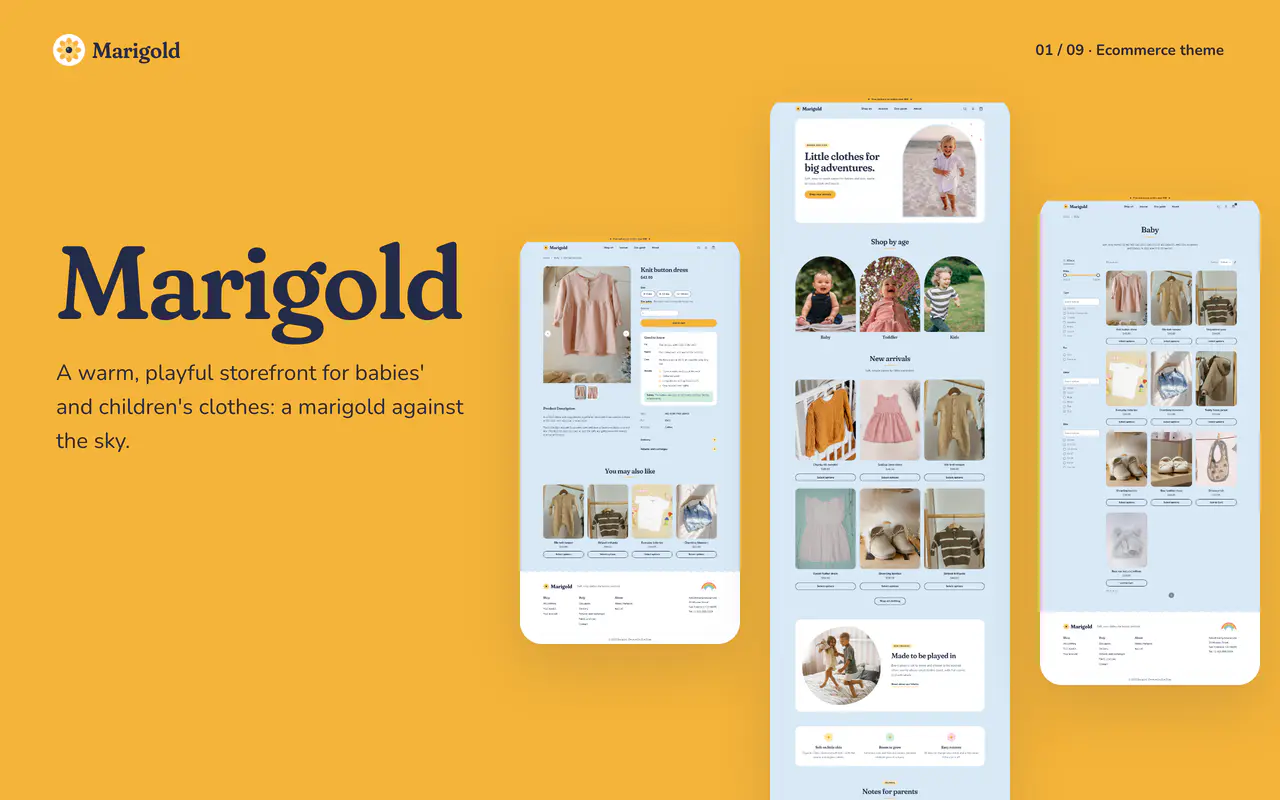
Overview
A warm, playful theme for shops that sell babies' and children's clothes. The page is a soft sky blue with white cards on it, the text is navy, and one sunny color, marigold, marks everything you press: a marigold against the sky. Rounded shapes (arches, a pebble, pill buttons) and a few small drawings (a flower, sparkles, a squiggle, a scalloped edge, a rainbow) bring the play. There are no cartoon characters or faces, so the photographs of your clothes stay the stars.
Marigold gives you a finished storefront in one step: a home page built from sections you can edit, six finished pages (About, Size guide, Fabric and care, Delivery, Returns and exchanges, and Contact), category pages with filters, a product page that answers parents' questions, a journal and a white footer. Activate it, replace the demo photographs with your own, and you are selling.
Good for: clothes for babies and children from newborn to about ten years old: dresses, rompers and jumpsuits, tees, shirts, knits, shorts, pants and jackets, first shoes and booties, and accessories such as hats, bibs and backpacks. It also suits a baby-gift shop or a children's boutique whose shoppers choose by age and size.
What you get
- A first screen that smiles. A white card on the sky with your headline, one button and a photograph in an arch, under a marigold announcement bar with two rotating lines.
- Shop by age. Baby, Toddler and Kids as three arches with their own photographs, then New arrivals (your six newest products), a story card with a photograph in a pebble, three promises and your latest journal posts.
- Filters parents expect. Price, age, type, who it is for, color and size on every listing, three across (two on a phone). Each colorway is one card, and its sizes are the size chips on the product page.
- A product page that answers questions. Photographs in a rounded gallery, color and size chips, a Size guide link and a tip for children between sizes, a "Good to know" card (fit, fabric, care, details and a safety note), the spec rows, Delivery and Returns rows, and "You may also like".
- Six pages that are more than text. About, Size guide and Fabric and care open with their title, a line and a wide photograph (a square one on a phone). Delivery and Returns open with their title on a white band. The words follow in an easy reading column, and each page closes with sections from the home page: the story card, the promises, New arrivals or the journal. Contact is a form, closed by the promises.
- Everything in the page builder. Every section is a widget you edit in the admin: cards, photo banners, text, product shelves and the contact form. No code needed.
- Words you edit in the admin. Fit, fabric, care, details and the safety note are fields on each product. The footer tagline, the delivery and returns text, the size tip and the size guide link are store fields.
Requirements
- EverShop 2.3 or newer.
- In the admin, under Settings, Catalog, Product images, set the size to 1200 × 1600 (3:4, upright), or any 3:4 size such as 1500 × 2000 for a sharper zoom. The product cards and the gallery are drawn for this upright shape. A 3:4 photograph fills the card; a garment shot as a cut-out on a transparent background sits on the card's white panel.
Install
On EverShop Cloud, choose Install on the item page. Marigold replaces your site's current theme.
On your own server, download the package from your order, then run this from your store's folder:
mkdir -p themes/marigold
tar -xzf evershop-theme-marigold-<version>.tgz -C themes/marigold --strip-components=1
npx evershop theme:active marigold
theme:active makes Marigold the active theme and installs its content: the home page sections, the header and footer menus, the six pages, and the fields you edit in the admin. Add --dry-run first to see what it would change. It then offers to run the build; restart your store afterwards.
Installing the theme never creates products. Your catalog stays yours.
After installing: fill in the store fields
Some of the theme's words are yours to write, and they stay hidden until you do. In the admin, open Settings, Store Setting and fill in the custom fields card at the bottom:
- Footer tagline: a short sentence beside the logo in the footer.
- Delivery info (product page) and Returns policy (product page): the text of the Delivery and Returns and exchanges rows under the buy box.
- Size tip (next to the size chips): one short line, such as "Between sizes? Choose the larger one."
- Size guide link (next to the size chips): the address of your Size guide page. The link appears on products with sizes once it is set.
The "Good to know" card appears on a product as soon as one of its fields (fit, fabric, care, details or safety) is filled in.
Demo content (optional)
To see the theme with a set of products, activate Marigold first, then load the demo data:
npx evershop seed --attributes --categories --collections --products --pages --blogIt adds a children's clothing catalog of 27 designs (76 products with their sizes and colors), its attributes (age, type, who it is for, material, color and size), three categories (Baby, Toddler and Kids), 5 content pages and 3 journal posts, with each product's fit, fabric and care filled in. Running it again skips products that already exist. The theme installs its own widgets, so leave --widgets out.
The 5 content pages are plain copies of the theme's pages; the journal posts link to them. The menus use the theme's own pages. The garment names, descriptions, prices and the delivery and returns text in the demo are invented: replace them before you open the store.
Good to know
- The photographs are stand-ins. The home page's pictures, the page banners, the journal covers and the demo catalog's product shots are free Unsplash and Pexels photographs of similar clothes, not your products. A few show another maker's small label or logo (one pair of sneakers shows a sports brand's mark). They are there so the theme looks finished the moment you install it. Replace them with your own in the page builder and on your products before you open the store.
- The links go to your whole catalog at first. The hero's button and the Baby, Toddler and Kids arches open the product listing, because a category's address exists only once you create it. Point them at your own categories in the page builder.
- "New arrivals" shows your newest products, not chosen ones.
- A size is a product. A card shows one colorway, and its button says "Select options" for anything with sizes. Only a one-size product says "Add to Cart".
- The footer reads your store settings: the store's email, phone and address. A field you leave empty is not shown.
- A link inside a page's text to another of your pages shows as plain words. EverShop does not link a page's address inside text. The menus, buttons and footer link as usual.
- Left out because EverShop cannot do it yet: sale prices, a wishlist, reviews, a size finder that turns a child's height into a size (the size guide is a page with tables), gift wrapping, a newsletter and back-in-stock alerts.
Fonts
Fraunces and Nunito (SIL Open Font License) are included and served from your own store. Both cover Latin, Latin Extended and Vietnamese; Nunito also covers Cyrillic.
Highlights
Good for
Baby and children's clothing shops: dresses, rompers, knits, tees, shorts and jackets, plus first shoes, hats, bibs and backpacks. It also suits baby-gift shops and children's boutiques.
A marigold against the sky
A soft sky-blue page with white cards and one sunny yellow: a hero with the photo in an arch, Shop by age arches, new arrivals, a story card, three promises and a journal.
Made for parents
Filters for age, type, color and size; size chips with a size guide link and a tip; and a Good to know card on each garment with fit, fabric, care and a safety note.
Edit it all in the page builder
The home page and six ready pages (About, Size guide, Fabric and care, Delivery, Returns, Contact) are page builder widgets: photo banners, cards, text, shelves and a form. No code.
Demo store in one step
Optional seed data: 27 designs (76 products with their sizes) in Baby, Toddler and Kids, plus attributes, 5 pages, 3 journal posts and 70 demo photos.
Requirements
Requires EverShop 2.3.0 or later. Set Settings › Catalog › Product images to 1200 × 1600 px, or any 3:4 size such as 1500 × 2000 for sharper zoom.
What's included
- Home page
- Category page
- Product page
- Blog & articles
- Landing pages
- Contact page
- Page builder
- Product filters (layered navigation)
- Demo seed data
Be the first to review this product
Write a review
Please log in to share your review of this product.
Changelog
- A new look: a soft sky-blue page with white cards and panels, a marigold announcement bar and navy text, in place of the cream page and oat panels.
- Photographs are included: free Unsplash and Pexels photographs for the hero, the Shop by age arches, the story card, the page banners, the journal covers and every demo product. A store that installs the theme no longer shows empty pictures.
- The pages are no longer plain text. About, Size guide and Fabric and care open with their title, a line and a wide photograph (a square one on a phone); Delivery and Returns open with their title on a white band. The text sits in a reading column, and each page, Contact included, closes with sections from the home page.
- A new demo catalog written to match its photographs: 27 designs (76 products with their sizes), with two new types, Rompers & jumpsuits and Shorts.
- The product gallery's arrows sit on a small white disc, so they stay visible on any photograph.
- The questions of an FAQ section sit on a white card.
- The announcement bar's sparkles take the bar's own text color, so they show on any color you pick for the bar.
- New marketplace screenshots.
Marigold
v0.2.0An EverShop theme for baby and children's clothing shops: a playful sky-blue look, shop by age, sizes with a size guide, and demo data with photos.
From$9.00/mo
| Lifetime orders | Monthly price |
|---|---|
| Up to 100 orders | $9.00/mo |
| Beyond 100 ordersmaximum | $15.00/mo |
Up to $15.00/mo — the maximum.
One-click install to your EverShop Cloud site
Self-hosted
Buy once and download the theme for your own EverShop installation.
$180.00 one-time
Download from your orders after payment — always the latest version.
- Version
- 0.2.0
- Last updated
- 2026-11-15
- Category
- Themes
- Type
- Theme
- Compatibility
- EverShop 2.x
- Package
- @evershop-theme/marigold