Kiln
v0.2.0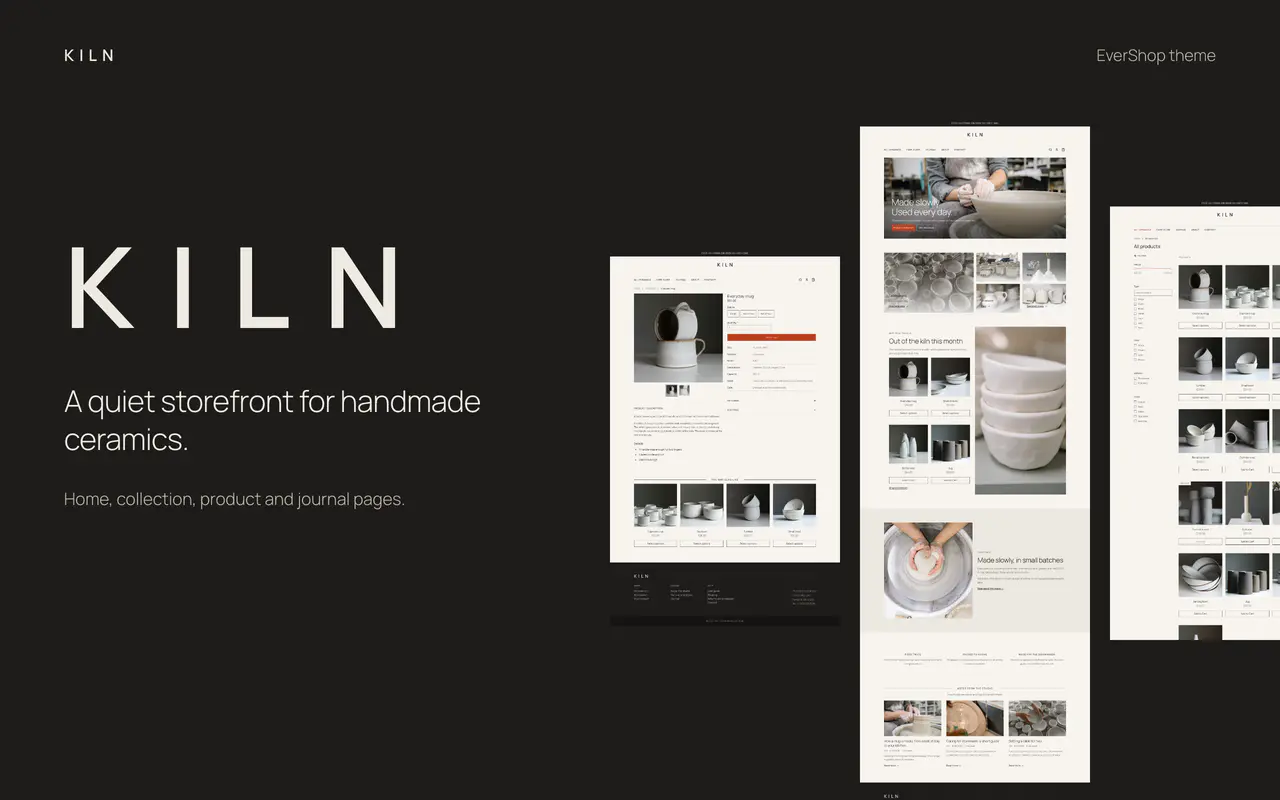
Overview
A quiet theme for shops that sell handmade ceramics. The store opens on a potter at the wheel; below it, everything steps back so the work shows: a warm paper ground, light type, thin lines instead of filled boxes, and one red-orange for the button you want pressed.
Kiln gives you a finished storefront in one step: a home page built from sections you can edit, six finished pages (About, Our clay and glazes, Care guide, Shipping, Returns and Contact), category pages with filters, a product page with spec rows, a journal and an ink-dark footer. Activate it, replace the demo photographs with your own, and you are selling.
Good for: pottery studios and ceramics shops selling tableware (bowls, plates), drinkware (mugs, cups, tumblers), vases and serveware (jugs, jars, serving bowls). It also suits other handmade homeware that shoppers buy by the piece or in sets, such as glassware, candles, wooden boards and table linen.
What you get
- A first screen that shows the making. A wide photograph under the wordmark and the menu, with a headline, one line and two buttons on a soft gradient. On a phone it becomes an upright picture, so the words keep their room.
- Your ranges at a glance. A "Shop by range" grid with one large tile and four small ones, then "New from the kiln": a tall photograph beside your four newest pieces.
- Square product cards. Bowls and stacks are wide, so every card and the product gallery are square. Category pages show them three across, with a "Sold out" flag on the photograph when a piece is gone.
- Filters shoppers expect. Price, type, color, material and finish on every listing.
- A product page that answers before they ask. A "Sold as" choice for pieces you sell singly or in sets, then spec rows for material, finish, dimensions, capacity, how it is made and how to care for it. Shipping and Returns open as two rows under them, and a "You may also like" shelf closes the page.
- Six pages that are more than text. About, Our clay and glazes and the Care guide open with their title and a wide photograph; Shipping, Returns and Contact open on a soft band, the first two with three key facts. The words follow as ruled rows, heading on the left, and each page closes with questions and answers or sections from the home page.
- Everything in the page builder. Every section is a widget you edit in the admin: banners, color bands, text, product shelves, fact strips, questions and answers, and the contact form. No code needed.
- A journal. Your newest three posts close the home page, and the blog is called "Journal" in the menu and on its own page.
Requirements
- EverShop 2.3 or newer.
- In the admin, under Settings, Catalog, Product images, set the size to 1200 × 1200 (square), or any square size such as 1600 × 1600 for a sharper zoom. The product cards and the gallery are drawn for this shape. Photograph every piece on the same plain ground, and the grid reads as one shop.
Install
On EverShop Cloud, choose Install on the item page. Kiln replaces your site's current theme.
On your own server, download the package from your order, then run this from your store's folder:
mkdir -p themes/kiln
tar -xzf evershop-theme-kiln-<version>.tgz -C themes/kiln --strip-components=1
npx evershop theme:active kiln
theme:active makes Kiln the active theme and installs its content: the home page sections, the header and footer menus, the six pages, and the two shop fields for the Shipping and Returns rows. Add --dry-run first to see what it would change. It then offers to run the build; restart your store afterwards.
Installing the theme never creates products. Your catalog stays yours.
Demo content (optional)
To see the theme with a set of products, activate Kiln first, then load the demo data:
npx evershop seed --attributes --categories --collections --products --pages --blogIt adds a ceramics catalog of 16 pieces (30 products with the sets of two and four), its attributes (type, color, material, finish, dimensions, capacity, how it is made, care and "Sold as"), four categories (Tableware, Drinkware, Vases and Serveware), 5 content pages and 3 journal posts. Running it again skips products that already exist. The theme installs its own widgets, so leave --widgets out.
Good to know
- The photographs are stand-ins. The home page's pictures, the page banners and the demo catalog's product shots are free Unsplash and Pexels photographs: real handmade pieces by other makers, and a potter's studio at work. They are not your products. They are there so the theme looks finished the moment you install it. Replace them with your own in the page builder and on your products before you open the store.
- The links go to your whole catalog at first. The header's "All ceramics" and the range tiles on the home page open the product listing, because a category's address exists only once you create it. Point them at your own categories in the page builder.
- "New from the kiln" shows your newest products, not chosen ones.
- Write your Shipping and Returns rows. The two rows on the product page read two shop fields the theme adds, "Shipping info (product page)" and "Returns policy (product page)". A row you leave empty is not shown.
- "Sold as" is an ordinary variant attribute. The demo catalog uses it for a single piece, a set of two and a set of four. Keep it, rename it, or leave it out.
- The footer reads your store settings: the store's name, email, phone and address. Payment marks are not shown.
Fonts
Manrope (SIL Open Font License) is included and served from your own store: Latin, Latin Extended, Vietnamese and Cyrillic.
Highlights
Good for
Pottery studios and ceramics shops; tableware, mugs, vases and serveware; and other handmade homeware sold by the piece or in sets: glass, candles, wood and linen.
Quiet, so the work shows
A wide studio hero, a grid of your ranges, the newest pieces beside a tall photo, your story on a soft band, three promises and the journal. Warm paper, thin lines, one red.
Edit it all in the page builder
The home page and six ready pages (About, Clay and glazes, Care guide, Shipping, Returns, Contact) are page builder widgets: banners, bands, text, facts and FAQs. No code.
Filters, sets and spec rows
Layered navigation on every listing: price, type, color, material and finish. Cups and bowls sell singly or as a set of two or four. Spec rows show size, capacity and care.
Demo store in one step
Optional seed data: 16 pieces (30 products with the sets) in Tableware, Drinkware, Vases and Serveware, plus attributes, 3 posts, 5 pages and 49 demo photos.
Requirements
Requires EverShop 2.3.0 or later. Set Settings › Catalog › Product images to 1200 × 1200 px, or any square size such as 1600 × 1600 for sharper zoom.
What's included
- Home page
- Category page
- Product page
- Blog & articles
- Landing pages
- Contact page
- Page builder
- Product filters (layered navigation)
- Demo seed data
Be the first to review this product
Write a review
Please log in to share your review of this product.
Changelog
- Photographs are included: free Unsplash and Pexels photographs for the home page's hero, the five range tiles, the spotlight and the studio story, for three page banners, the three journal covers and every demo product. A store that installs Kiln no longer shows empty banners and cards without a picture.
- Demo catalog rebuilt around those photographs: 16 pieces in Tableware, Drinkware, Vases and Serveware (Serveware replaces Desk), each in the one glaze it is photographed in, with descriptions that match their photographs. The dinner plate, pasta bowl, planter, pen cup and tray are gone, and so is the choice of glaze color.
- Cups and bowls are sold singly, as a set of two and as a set of four, through a "Sold as" choice on the product page. Color stays as a filter.
- Product cards and the product gallery are square (they were 3:4), and the recommended product image size is 1200 × 1200. Bowls and stacks are wide, and the upright frame cut them.
- The six pages (About, Our clay and glazes, Care guide, Shipping, Returns and Contact) are built from widgets: a title row with the page's first lines beside it, a wide photograph or a soft band, three key facts on Shipping and Returns, the text as ruled rows, questions and answers, and the home page's promises and journal. They were one block of text each, with no title.
- The contact form no longer repeats the Contact page's opening line.
- The product gallery's corners are square at every width (the main picture and the thumbnails kept rounded corners).
- Marketplace screenshots retaken from the lab: the photographs, the square cards, the "Sold as" choice and the current menu.
Kiln
v0.2.0An EverShop theme for pottery and ceramics shops selling tableware, mugs, vases and homeware: a studio hero, square cards, filters and demo data.
From$9.00/mo
| Lifetime orders | Monthly price |
|---|---|
| Up to 100 orders | $9.00/mo |
| Beyond 100 ordersmaximum | $15.00/mo |
Up to $15.00/mo — the maximum.
One-click install to your EverShop Cloud site
Self-hosted
Buy once and download the theme for your own EverShop installation.
$180.00 one-time
Download from your orders after payment — always the latest version.
- Version
- 0.2.0
- Last updated
- 2026-11-15
- Category
- Themes
- Type
- Theme
- Compatibility
- EverShop 2.x
- Package
- @evershop-theme/kiln