Daylight
v0.1.0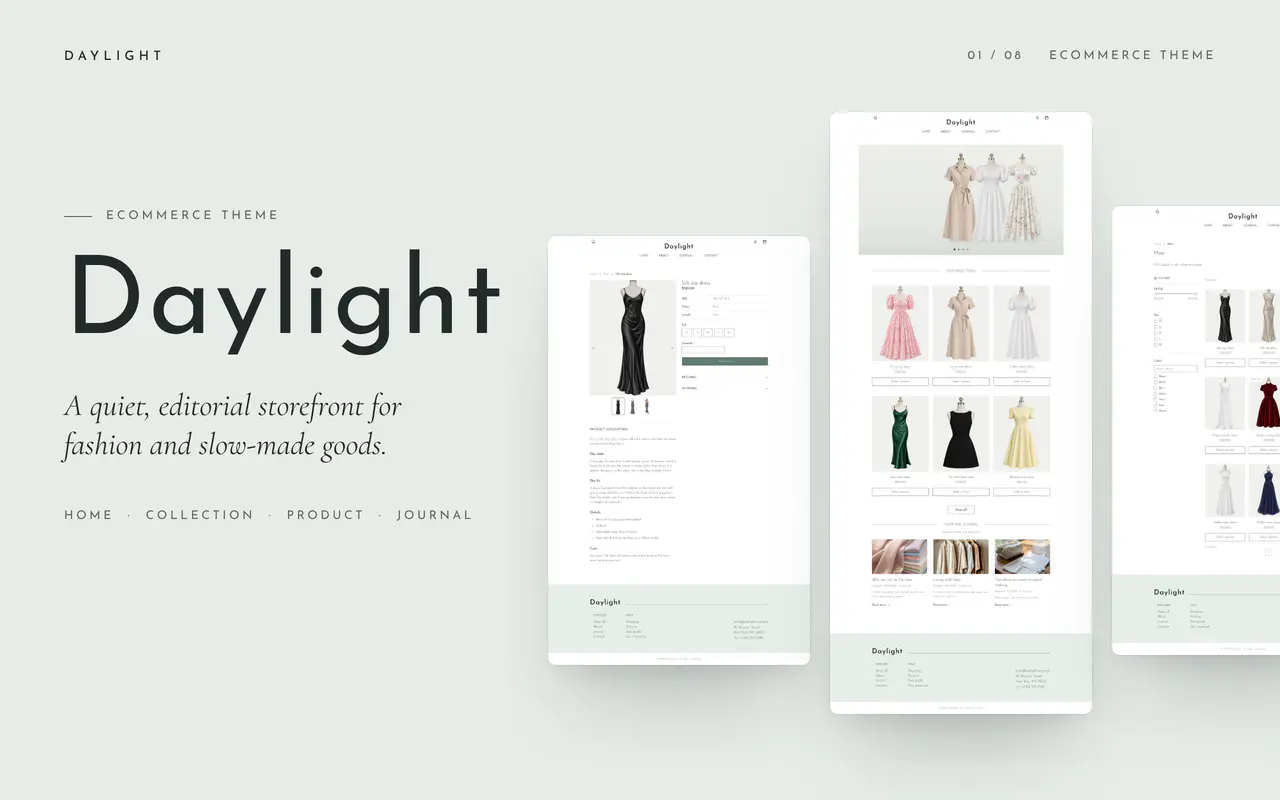
Overview
A quiet theme for a women's apparel store. A white ground, light type, one muted sage and hairlines instead of fills: natural light, concrete and linen.
Daylight gives you a finished storefront in one step: a framed hero slideshow, a featured-items shelf, a journal teaser, a Contact page, and a product page that stays out of the way. Activate it, replace the demo photographs with your own, and you are selling.
What you get
- A quiet, light look. Josefin Sans for every role, in light weights. A white ground, one muted sage, hairlines in place of filled boxes.
- A home page of three parts. A framed hero slideshow with dots only, a featured-items shelf with a Shop All button, and a "From the journal" teaser that always shows your newest three posts. Every part is a widget you edit in the page builder.
- Add to Cart on every list. Each product card has an outlined Add to Cart button under it, always visible. A product with options gets "Select options", which opens its page. A sold-out product carries a Sold out flag on its photograph.
- A product page that stays out of the way. The description sits under the gallery, with Shipping and Returns rows under the buy box.
- Edit the words in the admin. The shipping and returns text are shop fields, and your store settings (email, phone, address) fill the footer's contact column. No code needed.
- A journal and a Contact page. The blog is called "Journal" in the menu and on its own page.
Requirements
- EverShop 2.3 or newer.
- In the admin, under Settings, Catalog, set the product image size to 1200 × 1600 (3:4 portrait). The card frame is the theme's, but the image your store requests follows this setting.
Install
On EverShop Cloud, choose Install on the item page. Daylight replaces your site's current theme.
On your own server, download the package from your order, then run this from your store's folder:
mkdir -p themes/daylight
tar -xzf evershop-theme-daylight-<version>.tgz -C themes/daylight --strip-components=1
npx evershop theme:active daylight
theme:active makes Daylight the active theme and installs its content: the home page sections, the header and footer menus, the Contact page, and the fields you edit in the admin. Add --dry-run first to see what it would change. It then offers to run the build; restart your store afterwards.
Installing the theme never creates products. Your catalogue stays yours.
Demo content (optional)
To see the theme with a full set of products, load the demo data:
npx evershop seed --categories --collections --products --pages --blogIt adds a demo catalogue with its categories and collections (most products come as colour pairs with variants), 5 content pages and 3 journal posts. Running it again does not duplicate products, collections, pages or posts. The theme installs its own widgets, so leave --widgets out.
The demo photographs are placeholders. Replace them with your own before you open the store.
Good to know
- No sale prices. The theme shows one price per product, because core has no special price to show.
- Left out because core cannot do it: a gift card, quick view, previous and next links, chat, a social bar and a newsletter.
- Text over a photograph is yours to set. The type is light, so white text over a photo needs a scrim of about half strength to stay readable.
- The journal teaser shows the newest three posts, not chosen ones. Pick specific posts in the page builder if you want them.
Fonts
Josefin Sans (SIL Open Font License) is included and served from your own store: Latin, Latin Extended and Vietnamese.
Highlights
Quiet and light
A white ground, light type, one muted sage and hairlines instead of fills: natural light, concrete and linen.
Framed hero slideshow
A framed hero slideshow with dots only, a featured-items shelf and a journal teaser that always shows your newest three posts.
Add to Cart on every list
Every product list has an outlined Add to Cart button, or Select options when the product has variants, and a Sold out flag on the photo.
Demo wardrobe included
One seed command loads a demo catalogue with colour variants, categories, collections, content pages and journal posts.
What's included
- Home page
- Category page
- Product page
- Contact page
- Blog & articles
- Page builder
Be the first to review this product
Write a review
Please log in to share your review of this product.
Changelog
- First release of Daylight, a quiet theme for a women's apparel store.
- White ground, light Josefin Sans type and one muted sage.
- Home page with a framed hero slideshow, a featured-items shelf and a journal teaser.
- Add to Cart on every product list, a Sold out flag, and Shipping and Returns rows on the product page.
- Demo data for `evershop seed`: apparel with colour variants, pages and journal posts, with demo photographs.
Daylight
v0.1.0A quiet, light EverShop theme for women's apparel: a framed hero slideshow, Add to Cart on every card, a clean product page and a journal.
Self-hosted
Download the theme for your own EverShop installation.
Free
Download from your orders — always the latest version.
- Version
- 0.1.0
- Last updated
- 2026-11-15
- Category
- Themes
- Type
- Theme
- Compatibility
- EverShop 2.x
- Package
- @evershop-theme/daylight