Crema
v0.2.0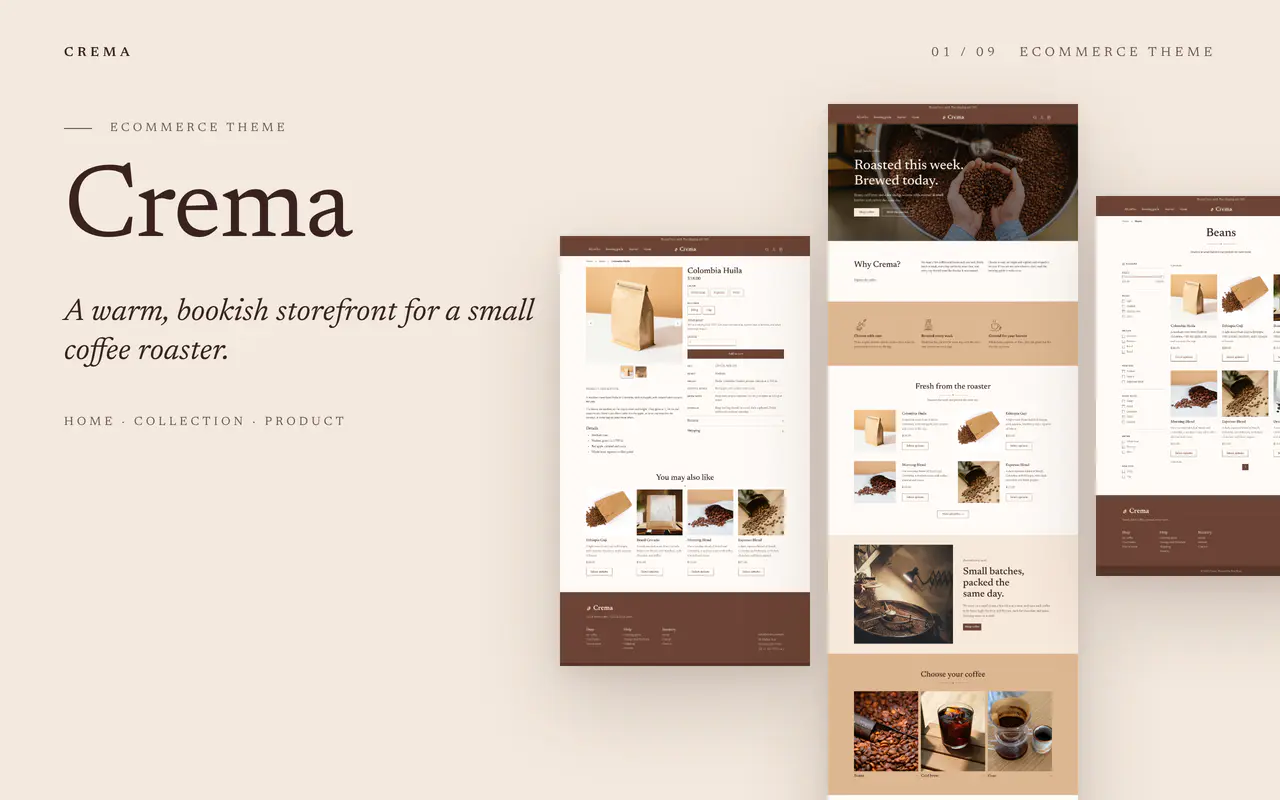
Overview
A warm, bookish theme for coffee roasters and coffee shops that sell beans online. One serif for every word, bands of warm white, cream and tan, and one roast brown for the header, the footer and the buttons. Section titles are set large, each with a small ornament under it, like the menu board of an old café.
Crema gives you a finished storefront in one step: a home page of nine bands you can edit, a Brewing guide and five more pages, category pages with coffee filters, a product page that helps people choose a grind and a bag size, a journal and a roast-brown footer. Activate it, replace the demo photographs and words with your own, and you are selling.
Good for: coffee roasters and coffee shops that sell bags of beans in several sizes and grinds, cold brew by the can, and brewing gear such as drippers and cups. It also suits other small-batch food and drink sold by size, such as tea or cocoa.
What you get
- A home page in nine bands. A photo hero with your headline and two buttons, a short "why us", three promises on a tan band, a shelf of your newest products, your story beside a photograph, your ranges as three photo tiles, where to find you, your newest journal posts, and a closing photo band above the footer.
- Two kinds of product card. A shelf set to two per row shows row cards: the picture beside the name, a sentence, the price and a button. Three or more per row gives tall cards; category pages show them three across.
- Filters for coffee. Price, roast, origin, process, main note, grind and bag size, plus color for gear.
- A product page that helps people choose. A square gallery, then one picker per choice, so a bag can offer a grind and a size at once. Under the pickers sit a "Which grind?" tip and a link to your Brewing guide; then spec rows (roast, origin, tasting notes, how to brew, storage), Returns and Shipping rows, and a "You may also like" shelf.
- A Brewing guide, ready to publish. A photo hero, the amounts and times for four ways to brew, pour-over and the press pot beside their steps, an espresso photo band, the three grinds, what to do when a cup tastes wrong, and your newest products.
- Five more pages. About, Storage and freshness, Shipping, Returns, and Contact with a contact form.
- Everything in the page builder. Every band, shelf, text and tile is a widget you edit in the admin. No code needed.
- A journal. Your blog is the Journal, in the menu and as the heading of its page.
Requirements
- EverShop 2.3 or newer.
- In the admin, under Settings, Catalog, Product images, set the size to 1200 × 1200 (square), or any square size such as 1600 × 1600 for a sharper zoom. The product cards and the gallery are drawn for this shape. A square photograph fills the card; a cut-out on a transparent background sits on the theme's pale panel.
Install
On EverShop Cloud, choose Install on the item page. Crema replaces your site's current theme.
On your own server, download the package from your order, then run this from your store's folder:
mkdir -p themes/crema
tar -xzf evershop-theme-crema-<version>.tgz -C themes/crema --strip-components=1
npx evershop theme:active crema
theme:active makes Crema the active theme and installs its content: the home page bands, the header and footer menus, the six pages and four shop fields for the product page. Add --dry-run first to see what it would change. It then offers to run the build; restart your store afterwards.
Installing the theme never creates products. Your catalog stays yours.
After installing: fill in the store fields
Some of the product page's words are yours to write, and they stay hidden until you do. In the admin, open Settings, Store Setting and fill in the custom fields card at the bottom:
- Shipping info (product page) and Returns policy (product page): the text of the Shipping and Returns rows under the buy box. A row you leave empty is not shown.
- Grind tip (next to the choices): one short line, such as "Not sure which grind? Filter suits pour-over and drip."
- Brewing guide link (next to the choices): the address of your Brewing guide page, usually
/brewing-guide.
The tip and the link appear only on products that have a grind to choose.
Demo content (optional)
To see the theme with a set of products, activate Crema first, then load the demo data:
npx evershop seed --attributes --categories --collections --products --blogIt adds a coffee catalog of 13 products (49 with their grinds, bag sizes and packs) in three categories (Beans, Cold brew and Gear), their attributes (roast, origin, process, main note, grind, bag size, pack, tasting notes and more) and 3 journal posts. Running it again skips products that already exist. If your store still has the Kids, Women and Men categories that older EverShop installs created, the demo data hides them. Leave out --widgets and --pages: the theme installs its own sections and pages, and --pages would only add plain-text copies of five of them.
Good to know
- The photographs are stand-ins. The home page pictures, the Brewing guide's photographs, the journal covers and the demo products' pictures are free Unsplash and Pexels photographs of coffee like the demo's, not yours. They are there so the theme looks finished the moment you install it. Replace them in the page builder and on your products before you open the store.
- So are some of the words. The announcement bar promises free shipping over $40, the "Visit the roastery" band gives an address in Portland and opening hours, and "Why Crema?" and the About page use the demo shop's name. Change them in the page builder.
- The range tiles open your whole catalog at first. Beans, Cold brew and Gear open the product listing, because a category's address exists only once you create it. Point them at your own categories in the page builder.
- "Fresh from the roaster" shows your newest products, not chosen ones. So does the shelf at the end of the Brewing guide.
- The sentence under a card's name is the product's SEO description. The card shows its first sentence; a product with an empty SEO description shows none.
- The card button says "Select options" for a product with choices, and "Add to Cart" only for a simple product.
- The footer reads your store settings: the store's name, email, phone and address. A field you leave empty is not shown. The line under the name, "Small-batch coffee, roasted every week.", is part of the theme.
- Left out because EverShop cannot do it yet: subscriptions, sale prices, an "Order now" button in the header and a mega menu. The menu is a plain list.
Fonts
Newsreader (SIL Open Font License) is included and served from your own store: Latin, Latin Extended and Vietnamese, with italics.
Highlights
Good for
Coffee roasters and coffee shops selling beans online: bags in several sizes and grinds, cold brew and brewing gear. Also tea, cocoa and other small-batch goods sold by size.
Warm and bookish
One serif, cream and tan bands, one roast brown. Nine home page bands: a photo hero, why us, promises, a shelf of bags, your story, ranges, your address, the journal and a closing photo.
Edit it all in the page builder
The home page and six ready pages are page builder widgets: a Brewing guide of photo bands and steps, plus About, Storage and freshness, Shipping, Returns and Contact. No code.
Filters, grinds and sizes
Filter by price, roast, origin, process, main note, grind and bag size. A bag can offer a grind and a size at once, with a "Which grind?" tip and a link to your brewing guide.
Demo store in one step
Optional seed data: 13 products (49 with their grinds, sizes and packs) in Beans, Cold brew and Gear, plus attributes and 3 journal posts. 41 photos included.
Requirements
Requires EverShop 2.3.0 or later. Set Settings › Catalog › Product images to 1200 × 1200 px, or any square size such as 1600 × 1600 for sharper zoom.
What's included
- Home page
- Category page
- Product page
- Contact page
- Blog & articles
- Landing pages
- Page builder
- Product filters (layered navigation)
- Demo seed data
Be the first to review this product
Write a review
Please log in to share your review of this product.
Changelog
- Photographs are included: free Unsplash and Pexels photographs for the home page (the hero shows hands holding fresh beans over a roaster's cooling tray), the Brewing guide, the three journal covers and every demo product (two each). A store that installs Crema no longer shows empty banners.
- The theme installs six pages itself: Brewing guide, About, Storage and freshness, Shipping, Returns and Contact (it installed only Contact before). The menus link to them, so every link works on a store that never loaded the demo data.
- The Brewing guide is a designed page: a photo hero, the amounts and times for four ways to brew, pour-over and the press pot beside their steps, an espresso photo band, the three grinds, what to do when a cup tastes wrong, and the newest products. It was one block of text.
- Links go only to what every store has: the range tiles open the product listing instead of the demo categories, and the footer links to the basket and the account. The cold brew shelf is gone (it showed a demo collection), so the home page has nine bands.
- The closing band at the foot of the home page centers its words and button (they sat in the right half).
- The search sheet is readable: it opened inside the brown header and kept its cream text on a white sheet. It now has the page's colors, a larger field, and results as wide as the field.
- On the product page, the spec rows and the Returns and Shipping rows form one ruled list (no empty gap between two lines), and each spec label lines up with its value.
- A product picture's pale panel no longer disappears in the tan and roast bands.
- The product gallery's arrows sit on a small paper square, so they stay visible on a dark photograph.
- The demo journal posts link to the Brewing guide and the Storage and freshness page that the theme installs, and the admin's example for the Brewing guide link field is `/brewing-guide`.
- New marketplace screenshots: the photographs, the current home page and the current menu.
Crema
v0.2.0An EverShop theme for coffee roasters and coffee shops selling beans online: grind and bag size choices, a brewing guide, filters and demo data.
From$9.00/mo
| Lifetime orders | Monthly price |
|---|---|
| Up to 100 orders | $9.00/mo |
| Beyond 100 ordersmaximum | $15.00/mo |
Up to $15.00/mo — the maximum.
One-click install to your EverShop Cloud site
Self-hosted
Buy once and download the theme for your own EverShop installation.
$180.00 one-time
Download from your orders after payment — always the latest version.
- Version
- 0.2.0
- Last updated
- 2026-11-15
- Category
- Themes
- Type
- Theme
- Compatibility
- EverShop 2.x
- Package
- @evershop-theme/crema