Cordovan
v0.2.0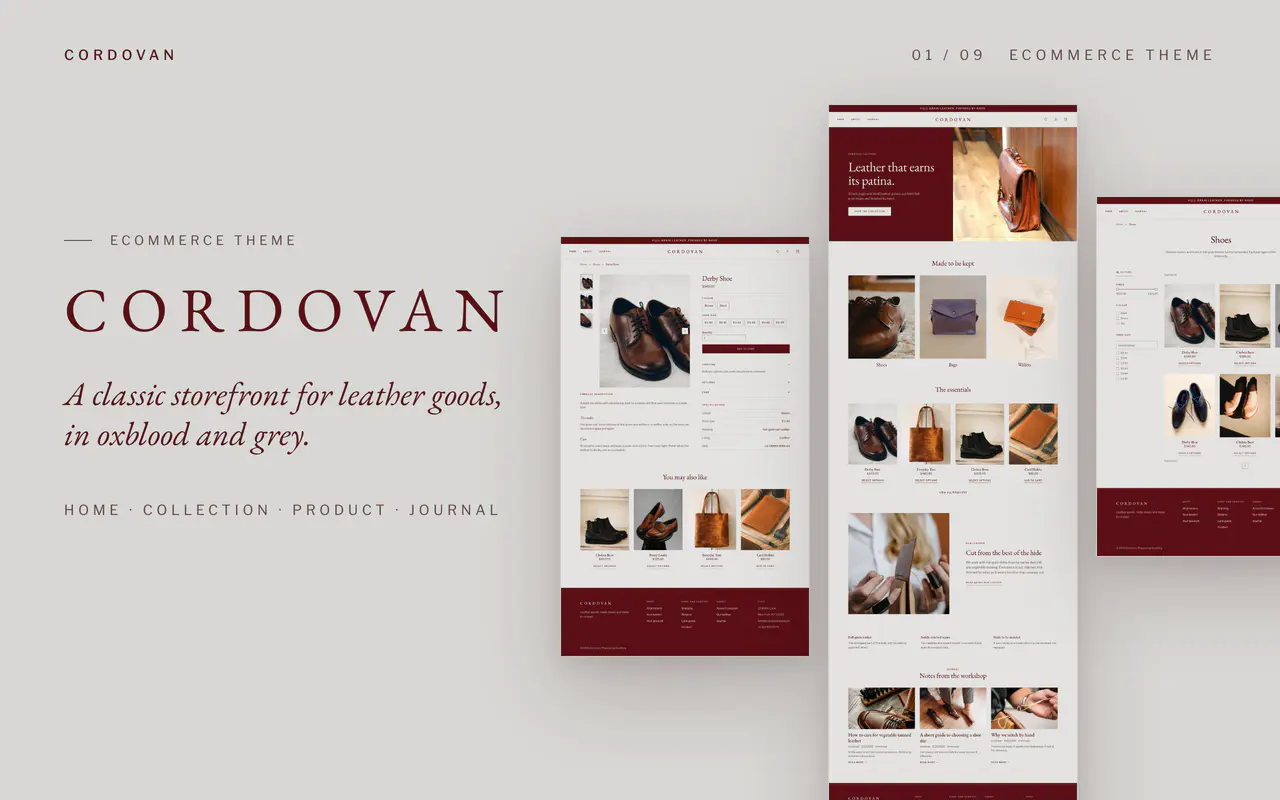
Overview
A classic theme for shops that sell leather goods: shoes, bags and wallets. Oxblood, the deep red that cordovan leather is known for, sits on a light grey page with thin lines, square corners and one dashed brass line like a row of stitching, so the leather in your photographs carries the page.
Cordovan gives you a finished storefront in one step: a home page built from sections you can edit, six finished pages (About, Our leather, Care guide, Shipping, Returns and Contact), category pages with filters, a product page with Shipping, Returns and Care rows, a journal and an oxblood footer. Activate it, replace the demo photographs with your own, and you are selling.
Good for: shoe shops (derbies, loafers, boots), bag makers (satchels, totes, messenger bags) and small leather goods (wallets, card holders, passport covers). It also suits other crafted goods that shoppers choose by color and size, such as belts, luggage and hats.
What you get
- A classic look in two colors. A light grey page, and oxblood for the text, the buttons, the announcement bar, the hero and the footer, with one brighter burgundy for labels and links. EB Garamond names things (products, categories, headlines) and Libre Franklin does the work (text, prices, buttons).
- A home page that tells your story. Your words on oxblood beside a photograph in a stitched frame, a mosaic of your ranges, The essentials (your newest products), your story, three promises and your newest journal posts.
- A product page for leather goods. Thumbnails in a column beside the photograph, color chips and, on shoes, size chips, then Shipping, Returns and Care rows, the specifications (material, lining, hardware, dimensions) and "You may also like".
- Filters shoppers expect. A filter column beside a three-across grid: price, color and, on shoes, shoe size.
- Six pages that are more than text. About, Our leather, Care guide and Contact open with a photo banner; Shipping and Returns with a quiet grey band. The words follow in a reading column, and About, Our leather and Care guide close with sections from the home page.
- Everything in the page builder. Every section is a widget you edit in the admin: banners, bands, text, product shelves and the contact form. No code needed.
- Words you write once. The footer's tagline and the Shipping, Returns and Care text on every product page are store fields: in the admin, under Settings › Store Setting, in the custom fields at the bottom.
- A journal. Your blog is called Journal in the menu and on its page, and its newest posts show on the home page.
Requirements
- EverShop 2.3 or newer.
- In the admin, under Settings, Catalog, Product images, set the size to 1200 × 1500 (4:5, upright), or any 4:5 size such as 1600 × 2000 for a sharper zoom. The product cards are drawn for this upright shape; a photograph of another shape is shown whole inside the frame, on a grey panel.
Install
On EverShop Cloud, choose Install on the item page. Cordovan replaces your site's current theme.
On your own server, download the package from your order, then run this from your store's folder:
mkdir -p themes/cordovan
tar -xzf evershop-theme-cordovan-<version>.tgz -C themes/cordovan --strip-components=1
npx evershop theme:active cordovan
theme:active makes Cordovan the active theme and installs its content: the home page sections, the header and footer menus, the six pages and the store fields you edit in the admin. Add --dry-run first to see what it would change. It then offers to run the build; restart your store afterwards.
Installing the theme never creates products. Your catalog stays yours.
Updating works the same way: unpack the new version over the old one and run theme:active cordovan again. It brings in what the new version changed and keeps the settings you changed yourself in the page builder.
Demo content (optional)
To see the theme with a set of products, activate Cordovan first, then load the demo data:
npx evershop seed --attributes --categories --collections --products --blogIt adds a leather catalog of 10 designs in 17 colorways (47 products with the shoe sizes) in three categories (Shoes, Bags and Wallets), their attributes (color, shoe size, material, lining, hardware and dimensions) and 3 journal posts. Running it again does not duplicate products, collections or posts. Leave out --widgets and --pages: the theme installs its own sections and pages, and --pages would only add plain copies of five of them that nothing links to.
Good to know
- The photographs are stand-ins. The home page's pictures, the page banners, the journal covers and the demo products' photographs are free Unsplash and Pexels photographs of similar leather pieces, not your products. They are there so the theme looks finished the moment you install it. Replace them with your own in the page builder and on your products before you open the store.
- The links go to your whole catalog at first. The hero's button and the Shoes, Bags and Wallets tiles open the product listing, because a category's address exists only once you create it. Point them at your own categories in the page builder.
- "The essentials" shows your newest products, not chosen ones.
- The footer reads your store settings: your store's name, and its email, phone and address (one you leave empty is not shown). Until you write your own tagline, the footer says "Leather goods, made slowly and made to be kept."
- The hero follows its picture. A split feature with its picture on the right is the full-width hero, with its words on oxblood; with its picture on the left it is the story block. The oxblood is part of the theme, not a color you pick in the page builder.
- Shoe sizes. EverShop's own Size attribute runs from XS to XXL, so the demo data adds a separate Shoe size attribute (EU 40 to 45). On your own store, create the size attribute that suits your products and mark it as a variant attribute: the product page shows every variant attribute as a row of chips.
- Not included, because EverShop itself does not offer them: sale prices, a wishlist, reviews, quick view, color swatches (color choices are text chips) and a newsletter form.
- A post's "Back to blog" link says "Blog". EverShop writes that word itself, whatever your menu calls the journal.
Fonts
EB Garamond and Libre Franklin (SIL Open Font License) are included and served from your own store: Latin, Latin Extended, Vietnamese and Cyrillic, with italics for all but Cyrillic.
Highlights
Good for
Leather goods shops: shoes and boots, bags and totes, wallets and card holders. It also suits other crafted goods sold by color and size, such as belts, luggage and hats.
Classic, in oxblood and grey
A hero with your words on oxblood beside a photo in a stitched frame, a mosaic of your ranges, the newest pieces, your story, three promises and a journal.
Edit it all in the page builder
The home page and six ready pages (About, Our leather, Care guide, Shipping, Returns, Contact) are page builder widgets: photo banners, title bands, text, shelves and a form. No code.
Made for leather goods
Color and shoe size as chips and filters. Shipping, Returns and Care rows on every product page, written once in the admin, and spec rows for material, lining, hardware and dimensions.
Demo store in one step
Optional seed data: 10 designs in 17 colorways (47 products with the shoe sizes) in Shoes, Bags and Wallets, plus attributes, 3 journal posts and 67 demo photos.
Requirements
Requires EverShop 2.3.0 or later. Set Settings › Catalog › Product images to 1200 × 1500 px, or any 4:5 size such as 1600 × 2000 for sharper zoom.
What's included
- Home page
- Category page
- Product page
- Blog & articles
- Landing pages
- Contact page
- Page builder
- Product filters (layered navigation)
- Demo seed data
Be the first to review this product
Write a review
Please log in to share your review of this product.
Changelog
- ### Added
- Demo photographs: free Unsplash and Pexels photographs for the home page, the page banners, the journal covers and every demo product (three each), so a new store looks finished from the start.
- Five more pages install with the theme, beside Contact: About, Our leather, Care guide, Shipping and Returns. About, Our leather, Care guide and Contact open with a photo banner; Shipping and Returns with a grey title band.
- Shoe sizes in the demo data: a Shoe size attribute (EU 40 to 45), shown as a second row of chips on the product page and as a filter on the listing.
- A "Specifications" heading above the spec rows on the product page.
- ### Changed
- A new palette, Oxblood and grey: a light grey page with oxblood for the text, the buttons, the announcement bar and the footer, and one burgundy accent, in place of the warm paper, espresso and cognac. Error messages are an orange-red, so they never read as the accent.
- The hero's words sit on an oxblood panel beside the photograph.
- The demo catalog: 10 designs in 17 colorways (47 products with the shoe sizes), with descriptions that match their photographs. The tan Document Satchel and the Weekender Bag are gone; a brown Messenger Bag takes the Weekender's place.
- ### Fixed
- The menus and the home page link only to pages every store has (the product listing, the journal and the theme's own pages), so nothing points at a category a new store does not have yet.
- Keyboard focus now shows on buttons, calls to action, pagination links and the price slider's handles, and the focus ring on the oxblood footer is light.
- The hero photograph fills its half of the screen at every width, and sits right under the header on a phone.
- The product gallery's arrows sit on a small square, so they stay visible on a dark photograph.
Cordovan
v0.2.0An EverShop theme for leather goods shops selling shoes, bags and wallets: a classic oxblood and grey look, shoe sizes, filters and demo data with photos.
Self-hosted
Download the theme for your own EverShop installation.
Free
Download from your orders — always the latest version.
- Version
- 0.2.0
- Last updated
- 2026-11-14
- Category
- Themes
- Type
- Theme
- Compatibility
- EverShop 2.x
- Package
- @evershop-theme/cordovan