Claret
v0.2.0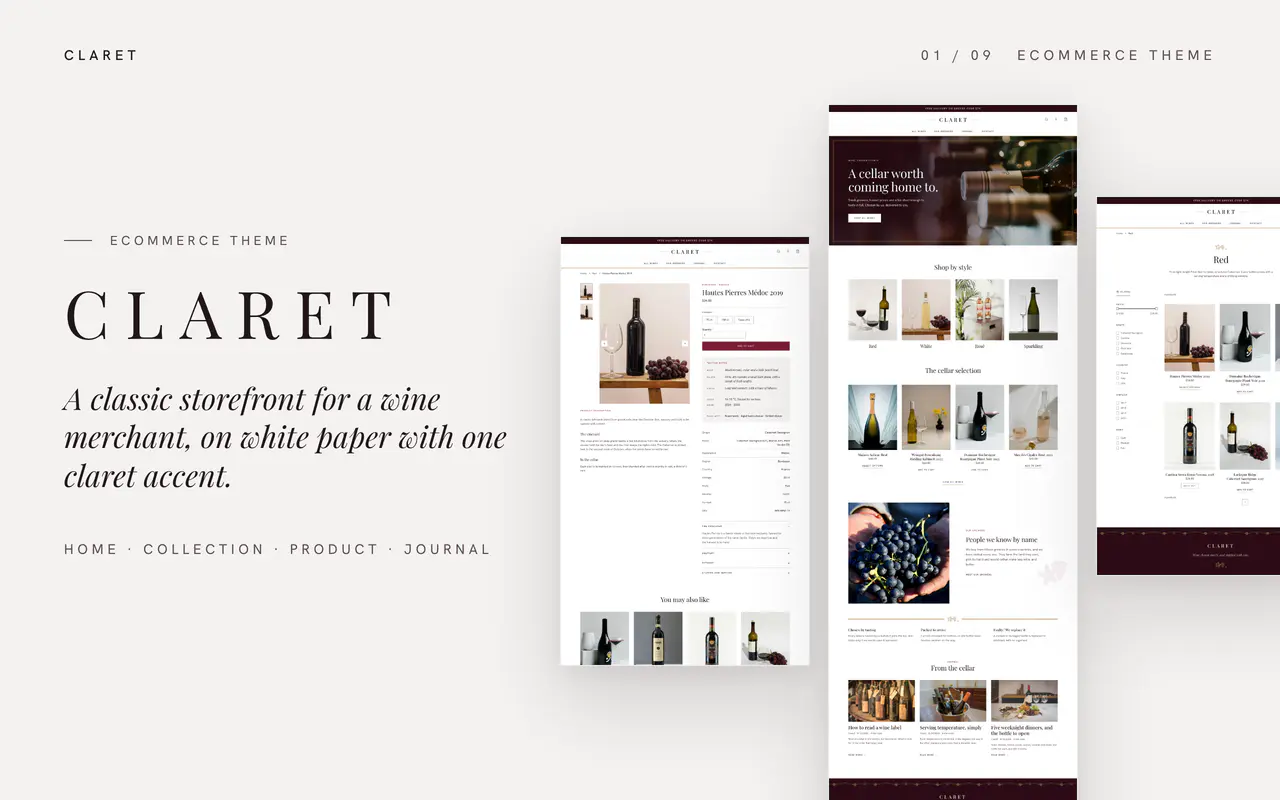
Overview
A classic theme for shops that sell wine. A wide cellar photograph opens the store, with the headline inside a gilt double rule, like the border of a wine label. Below it the page is white paper with aubergine-black ink, thin lines and square corners, so the bottles stay in front. One accent, claret, does the jobs a wine-red should: the button, the labels, the links.
Claret gives you a finished storefront in one step: a home page built from sections you can edit, six ready pages (About, Our growers, Delivery, Returns, Storing and serving, and Contact with a form), category pages with wine filters, a product page with a tasting card, a journal and a deep wine-black footer. Activate it, replace the demo photographs with your own, and you are selling.
Good for: wine shops and wine merchants, wineries and estates that sell direct, and specialists in champagne, sparkling or natural wine. It also suits other bottles that shoppers choose by origin and taste, such as whisky, gin, sake and cider.
What you get
- A first screen that sets the mood. One wide photograph across the screen, with a short label, a headline, a sentence and one button over it. It has its own upright picture for phones.
- Shop by style. Four tall photo tiles (Red, White, Rosé, Sparkling) with their names set in the serif, then "The cellar selection": your four newest wines.
- A product page for wine. The region and country above the name, format chips (bottle, magnum, case of six), the buy box, then a tasting card: nose, palate and finish in italic, how to serve, when to drink and what it pairs with. Below it come the spec rows (grape, blend, appellation, vintage, body, alcohol) and rows for The producer, Delivery, Returns, and Storing and serving.
- Filters shoppers expect. Price, category and your wine attributes on every listing. The demo uses Grape, Country, Vintage and Body. Products sit three across on tall 3:4 panels.
- A growers story and three promises. A photograph beside a short story about who makes your wine, then three short promises under a gilt double rule with a sprig of vine.
- Everything in the page builder. Every section of the home page and the six pages is a widget you edit in the admin: the photo banner, tiles, product shelves, text, the contact form and the fact strip. No code needed.
- Words you edit in the admin. The footer tagline, the drinking notice, and the delivery, returns and storing text are shop fields. The tasting notes, drinking window, pairings and producer text are product fields. A wine with no tasting notes shows no tasting card.
- A journal. Your newest posts on the home page and on the blog, which is called "Journal" in the menu and on its own page.
Requirements
- EverShop 2.3 or newer.
- In the admin, under Settings, Catalog, Product images, set the size to 1200 × 1600 (3:4, upright), or any 3:4 size such as 1500 × 2000 for a sharper zoom. The product cards and the gallery are drawn for this upright shape, which suits a standing bottle. A photograph of another shape still works: it stands inside the panel, and the panel's pale grey shows around it.
Install
On EverShop Cloud, choose Install on the item page. Claret replaces your site's current theme.
On your own server, download the package from your order, then run this from your store's folder:
mkdir -p themes/claret
tar -xzf evershop-theme-claret-<version>.tgz -C themes/claret --strip-components=1
npx evershop theme:active claret
theme:active makes Claret the active theme and installs its content: the home page sections, the header and footer menus, the six pages, and the fields you edit in the admin. Add --dry-run first to see what it would change. It then offers to run the build; restart your store afterwards.
Installing the theme never creates products. Your catalogue stays yours.
Demo content (optional)
To see the theme with a cellar of wines, activate Claret first, then load the demo data:
npx evershop seed --attributes --categories --collections --products --pages --blogIt adds 15 wines (19 products: two of them also come as a magnum and a case of six), their attributes (type, grape, blend, appellation, region, country, vintage, body, alcohol, format and farming), four categories (Red, White, Rosé and Sparkling), 5 content pages and 3 journal posts. Running it again skips products that already exist. The theme installs its own widgets, so leave --widgets out.
The wine names, producers, tasting notes, and the delivery and returns text in the demo are invented. Replace them before you open the store.
Good to know
- The photographs are stand-ins. The home page's pictures, the journal covers and the demo wines' product shots are free Unsplash and Pexels photographs. They show bottles close to each demo wine, not the wines themselves, and six of the demo wines carry a real producer's label. They are there so the theme looks finished the moment you install it. Replace them with your own in the page builder and on your products before you open the store.
- The links go to your whole catalogue at first. The header's "All wines", the hero's button and the four "Shop by style" tiles open the product listing, because a category's address exists only once you create it. Point them at your own categories in the page builder.
- "The cellar selection" shows your newest products, not chosen ones.
- The header shows your store's name as a wordmark until you upload a logo. A long name is set smaller so that it fits. Set the name under Settings, Store.
- The footer reads your store settings: the store's name, address, email and phone. A field you leave empty is not shown.
- Keep the left of your hero photograph dark and calm. The words stand over the left of the picture on a desktop, and over the whole of it on a phone.
- A sold-out wine is hidden from listings until you turn on the out-of-stock option under Settings, Catalog. That is EverShop's own setting; the demo has one sold-out wine.
- No age check. The footer carries a line that you must be of legal drinking age. It does not check anyone's age.
- Left out because EverShop does not have it: sale prices, a wishlist, reviews, a wine club or subscriptions, and a newsletter.
- The theme's own words are English. Labels such as "Tasting notes", "Nose" and "Delivery" stay English until your store's translations cover them. The journal's breadcrumb says "Blog": EverShop writes that word.
Fonts
Playfair Display and Hanken Grotesk (SIL Open Font License) are included and served from your own store. Both cover Latin, Latin Extended and Vietnamese; Playfair Display also covers Cyrillic.
Highlights
Good for
Wine shops and merchants, wineries selling direct, and champagne or natural wine specialists. It also suits bottles sold by origin and taste: whisky, gin, sake and cider.
Dressed like a wine label
A wide cellar photograph opens the store, its words inside a gilt double rule. Below it: white paper, aubergine ink, one claret accent and names set in Playfair Display.
Made for wine
A tasting card on every wine: nose, palate, finish, how to serve, when to drink and what it pairs with. Filters for grape, country, vintage and body; bottle, magnum and case formats.
Edit it all in the page builder
The home page and six ready pages (About, Our growers, Delivery, Returns, Storing and serving, Contact) are page builder widgets: a photo banner, tiles, shelves and text. No code.
Demo cellar in one step
Optional seed data: 15 wines (19 products with magnums and cases) in Red, White, Rosé and Sparkling, plus wine attributes, 5 pages, 3 journal posts and 40 demo photos.
Requirements
Requires EverShop 2.3.0 or later. Set Settings › Catalog › Product images to 1200 × 1600 px, or any 3:4 size such as 1500 × 2000 for sharper zoom.
What's included
- Home page
- Category page
- Product page
- Contact page
- Blog & articles
- Landing pages
- Page builder
- Product filters (layered navigation)
- Demo seed data
Be the first to review this product
Write a review
Please log in to share your review of this product.
Changelog
- A new first screen: one wide cellar photograph across the screen with the headline, a sentence and a button over it, inside a gilt double rule. It has its own upright picture for phones. It replaces the half-and-half block (words on the left, a square photograph on the right).
- A new look for the page: white paper with very pale grey panels, in place of the cream page and beige panels. The ink, the claret accent, the gilt lines and the dark footer are unchanged.
- Photographs are included: free Unsplash and Pexels photographs for the hero, the four "Shop by style" tiles, the growers story, the three journal covers and every demo wine (two each, a bottle on a light studio ground). A store that installs Claret no longer shows empty banners.
- A new demo catalogue written to match its photographs: 15 wines (19 products with the magnums and cases) in Red, White, Rosé and Sparkling. The Dessert & fortified category is gone.
- The header menu is All wines, Our growers, Journal and Contact, and every link works on a store that has only installed the theme. The five text pages (About Claret, Our growers, Delivery, Returns, Storing and serving) are installed with the theme, next to Contact.
- The store's name in the header is set smaller when it is long, so it stays inside the header on a phone (a new store's default name wrapped to four lines).
- The menu's underline sits under the letters, clear of the header's double rule.
- The product gallery's arrows sit on a small white square, so they stay visible on a dark photograph.
- A demo wine's breadcrumb ends in the wine's name (it ended in "| Claret").
- New marketplace screenshots.
Claret
v0.2.0An EverShop theme for wine shops, merchants and wineries: a cellar photo hero, tasting notes on every wine, filters by grape and vintage, and demo data.
From$9.00/mo
| Lifetime orders | Monthly price |
|---|---|
| Up to 100 orders | $9.00/mo |
| Beyond 100 ordersmaximum | $15.00/mo |
Up to $15.00/mo — the maximum.
One-click install to your EverShop Cloud site
Self-hosted
Buy once and download the theme for your own EverShop installation.
$180.00 one-time
Download from your orders after payment — always the latest version.
- Version
- 0.2.0
- Last updated
- 2026-11-15
- Category
- Themes
- Type
- Theme
- Compatibility
- EverShop 2.x
- Package
- @evershop-theme/claret