Aura
v0.1.0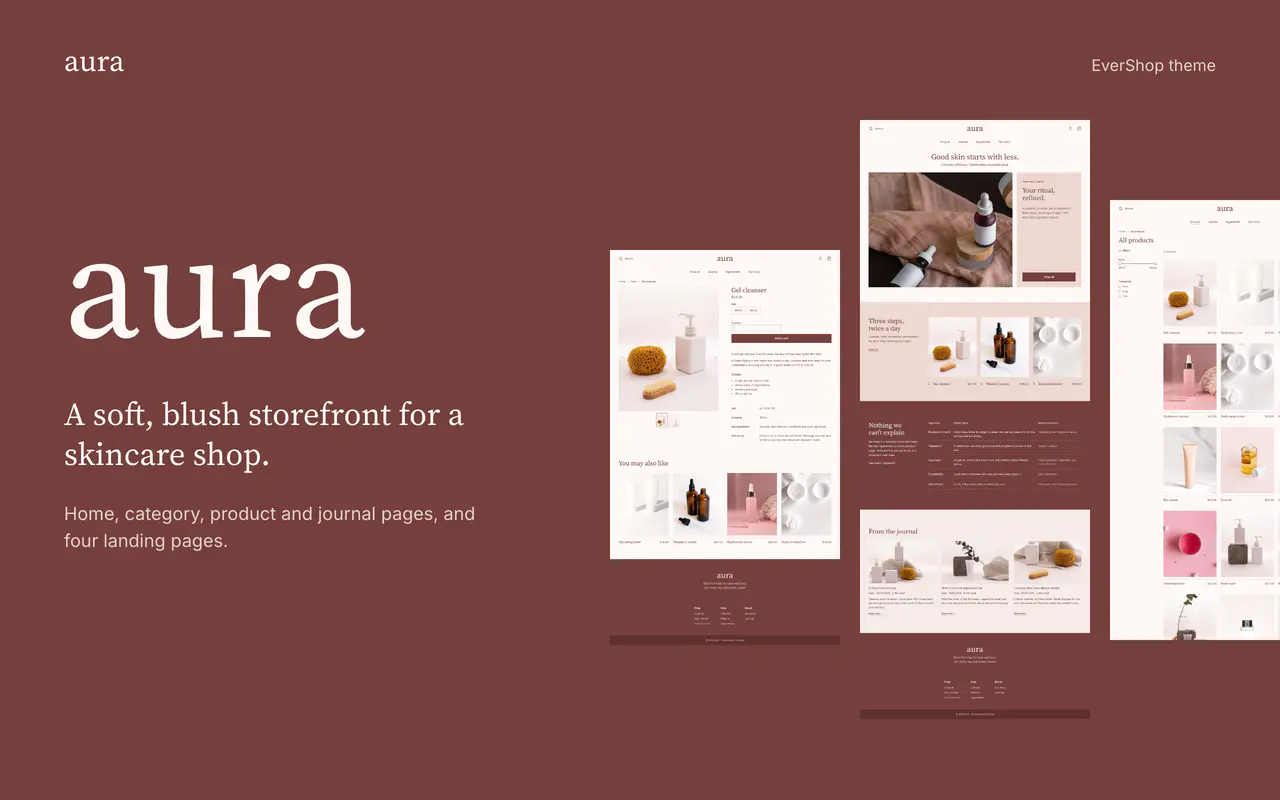
Overview
A soft, blush theme for skincare shops. The store opens like a well-made label: a centered wordmark and a short statement, then a studio photograph beside a blush panel. Below it, the shop explains itself the way the back of a pack does: the routine in three numbered steps, the key ingredients named in full, and every product with its contents, key ingredients and how to use it.
Aura gives you a finished storefront in one step: a home page built from sections you can edit, four finished pages (Our story, Ingredients, Delivery and Returns), category pages with filters, a product page laid out like the front and the back of a pack, a journal and a berry footer. Activate it, replace the demo photographs with your own, and you are selling.
Good for: skincare shops selling face care (cleansers, toners, serums, moisturizers, eye creams, face oils, masks and lip balms), body care (washes, lotions, hand creams, body oils and scrubs) and gift sets. It also suits other shops that sell by size in milliliters and name what is inside, such as bath and body, hair care, fragrance and cosmetics.
What you get
- A first screen that sells the routine. A centered wordmark and menu, your statement in a large serif, then a wide studio photograph beside a full-height blush panel with a short label, a headline, one sentence and one button. On a phone the panel sits under its own upright photograph.
- The routine in three steps. Your three newest products sit on a blush band, each card numbered, beside a short heading and a link to the whole shop.
- Key ingredients, named. A berry band lists five ingredients, what each one does and which products have it, with a button to the Ingredients page.
- Cards with one ruled line. An upright photograph, then the name at the left and the price at the right on one thin line. Category pages show them three across.
- Filters shoppers expect. Price on every listing, the categories on the all-products page, the sub-categories on a category page, and any attribute you make filterable, such as a tint or a skin type. Products can vary by size in ml, shown as choices on the product page.
- A product page like a pack. The front: name, price, size, quantity and the button. The back: the description, then rows for contents, key ingredients and how to use. A "You may also like" shelf follows.
- Four pages that are more than text. Our story, Ingredients, Delivery and Returns open with a centered title and a studio photograph. The words follow as ruled rows, the heading at the left and the text at the right. The Ingredients page lists every key ingredient as a list your team can edit. Our story closes with the routine band, Ingredients with the journal, and Delivery and Returns with questions and answers from each other's page.
- Everything in the page builder. Every section is a widget you edit in the admin: banners, color bands, text, product shelves, questions and answers. No code needed.
- A journal. Your newest three posts on a quiet band at the foot of the home page; the blog lists them all.
Requirements
- EverShop 2.3 or newer.
- In the admin, under Settings, Catalog, Product images, set the size to 1200 × 1500 (4:5, upright), or any 4:5 size such as 1600 × 2000 for a sharper zoom. The product cards and the gallery are drawn for this upright shape, which suits bottles, jars and tubes.
Install
On EverShop Cloud, choose Install on the item page. Aura replaces your site's current theme.
On your own server, download the package from your order, then run this from your store's folder:
mkdir -p themes/aura-beauty
tar -xzf evershop-theme-aura-beauty-<version>.tgz -C themes/aura-beauty --strip-components=1
npx evershop theme:active aura-beauty
theme:active makes Aura the active theme and installs its content: the home page sections, the header and footer menus and the four pages. Add --dry-run first to see what it would change. It then offers to run the build; restart your store afterwards.
Installing the theme never creates products. Your catalog stays yours.
Demo content (optional)
To see the theme with a set of products, activate Aura first, then load the demo data:
npx evershop seed --attributes --categories --collections --products --blogIt adds a skincare catalog of 16 products (23 with their sizes), its attributes (contents, key ingredients, how to use and size), three categories (Face, Body and Sets), three collections and 3 journal posts. The newest three products it creates are the cleanser, the serum and the moisturizer, so the routine band shows them in order. Running it again skips products that already exist. The theme installs its own widgets and pages, so leave --widgets and --pages out.
Good to know
- The photographs are stand-ins. The banner, the page photographs, the journal covers and the demo catalog's product shots are free Pexels and Unsplash photographs of blank, unlabeled packs in a studio, not your products. Each one is credited in
public/demo/CREDITS.md. They are there so the theme looks finished the moment you install it. Replace them with your own in the page builder and on your products before you open the store. - White words need a darker tint over these photographs. They are light. If you lay white words over one in a banner or a slide, set the dark tint to 0.55 or more so the words stay readable. The theme's own banner puts its words on the blush panel instead.
- The routine band shows your three newest products, not chosen ones, and numbers them 1, 2 and 3. Change the band's words to suit, or paint the band another color to drop the numbers.
- "Clinically effective." is the design's own line. Keep it only if your store can back it; change it in the page builder.
- The ingredient table on the home page is a small piece of HTML inside its text block. Change its five rows there; the Ingredients page itself is a plain list.
- The links go to your whole catalog at first. The menu's "Shop all" and the home page's "Shop all" buttons open the product listing. Add your own categories to the menu in the page builder.
- The footer shows your store's name from the store settings, with one line under it that is part of the theme.
- The journal page's heading says "Blog". EverShop writes that word on the journal page, whatever the menu says.
Fonts
Source Serif 4 and Inter (SIL Open Font License) are included and served from your own store: Latin, Latin Extended and Vietnamese.
Highlights
Good for
Skincare shops: cleansers, serums, moisturizers, masks, lip balms, body care and gift sets. Also bath and body, hair care, fragrance and cosmetics sold by size in ml.
Designed like a good label
A studio photograph beside a blush panel opens the store; then the routine in three numbered steps, key ingredients on a berry band, and cards that end in one ruled line.
Edit it all in the page builder
The home page and four ready landing pages (Our story, Ingredients, Delivery, Returns) are page builder widgets: banners, color bands, text, shelves and FAQs. No code.
Filters and product details
Layered navigation: price on every listing, categories on the all-products page, any attribute you make filterable. Sizes in ml as variants; key ingredients as rows.
Demo store in one step
Optional seed data: 16 products (23 with their sizes) in Face, Body and Sets, plus attributes, collections, 3 journal posts and 45 credited photos of blank packs.
Requirements
Requires EverShop 2.3.0 or later. Set Settings › Catalog › Product images to 1200 × 1500 px, or any 4:5 size such as 1600 × 2000 for sharper zoom.
What's included
- Home page
- Category page
- Product page
- Blog & articles
- Landing pages
- Page builder
- Product filters (layered navigation)
- Demo seed data
Be the first to review this product
Write a review
Please log in to share your review of this product.
Changelog
- First release of Aura, a soft, blush theme for skincare shops: face care, body care and sets.
- A blush-white ground, one berry ink and one blush panel, with Source Serif 4 for the wordmark, headlines and names and Inter for everything else.
- Home page with a centered statement, a studio photograph beside a blush panel, the routine in three numbered steps on a blush band, five key ingredients on a berry band and the journal.
- Listings with filters (price, and the categories on the all-products page), cards that end in one ruled line (the name at the left, the price at the right), and a product page laid out like the front and back of a pack, with a "You may also like" shelf.
- Four pages built from widgets: Our story, Ingredients, Delivery and Returns, each with a centered title, a photograph and its text as ruled rows.
- Demo data for `evershop seed`: a skincare catalog (16 products, 23 with their sizes) and journal posts, with free Pexels and Unsplash photographs of blank packs included and credited in `public/demo/CREDITS.md`.
Aura
v0.1.0An EverShop theme for skincare shops selling face and body care: a studio hero beside a blush panel, a numbered routine, filters and demo data.
Self-hosted
Download the theme for your own EverShop installation.
Free
Download from your orders — always the latest version.
- Version
- 0.1.0
- Last updated
- 2026-11-15
- Category
- Themes
- Type
- Theme
- Compatibility
- EverShop 2.x
- Package
- @evershop-theme/aura-beauty