Atelier
v1.1.1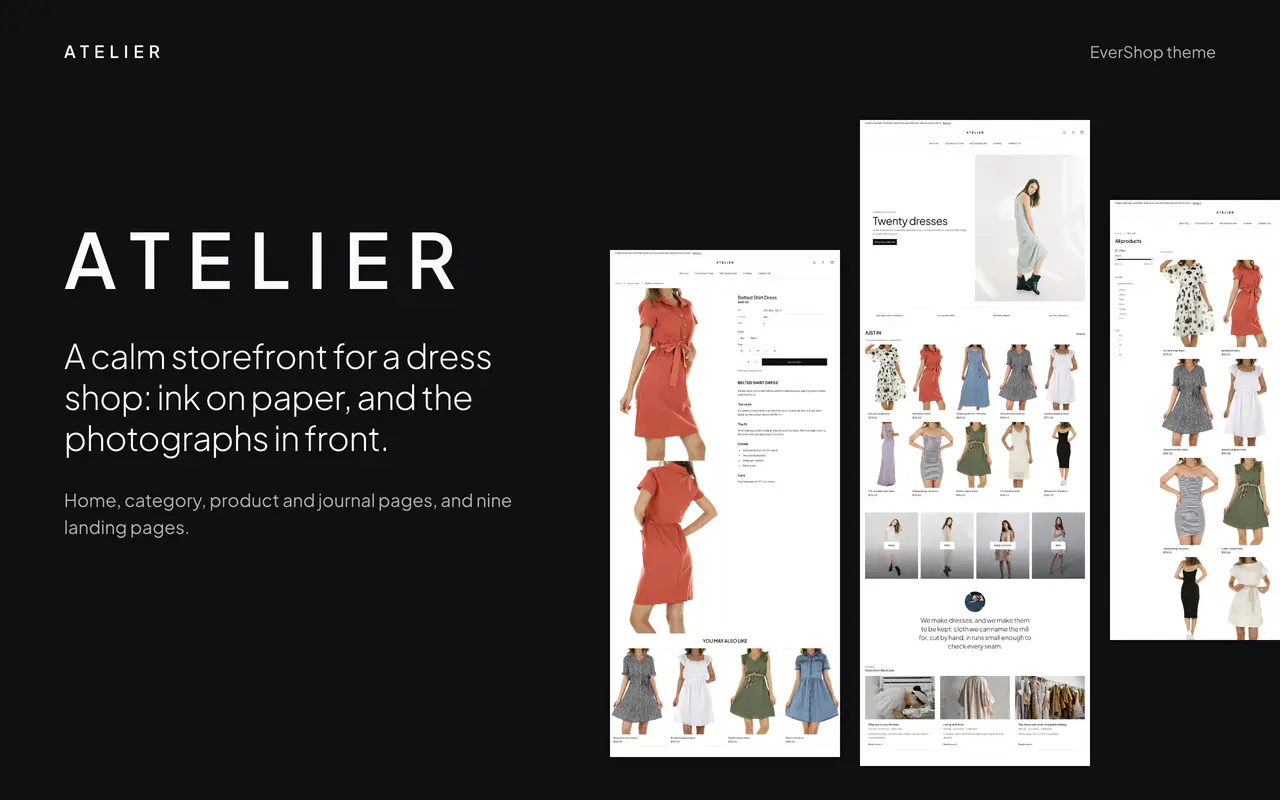
Overview
A calm, editorial theme for fashion boutiques and dress shops. One typeface, ink on white paper, hairline rules and square corners: the photographs lead, and the interface stays out of their way.
Atelier gives you a finished storefront in one step: a home page built from sections you can edit, nine ready pages, category pages with filters, a product page that offers every size and color as a chip, a journal and an ink footer. Activate it, replace the demo photographs with your own, and you are selling.
Good for: dress shops and fashion boutiques, and women's clothing that shoppers choose by size and color, such as dresses, skirts, shirts and knitwear. It also suits a small label or a designer's own shop that wants its photographs to lead.
What you get
- A first screen for one collection. One headline and one button on white paper beside a tall photograph, then your promises (delivery, returns, checkout) on one ruled line.
- The newest dresses, five across. Tall 2:3 photographs in a hairline grid. The cards carry no add-to-cart button, because every dress needs a size. Category pages use the same cards, three across on desktop and two on phones.
- Four tiles and a sentence. Upright photo tiles with small paper labels lead into your catalog, and your shop's statement follows, set large under a round photograph.
- Filters shoppers expect. Price, color and size on every listing, with sorting built in.
- A product page for clothes. Large photographs one under another on the left half of the screen (two side by side on phones and tablets), and beside them, staying in view while you scroll, the name, the price and every choice as a chip: a size on every dress, and a color where a design has two. The description sits under the buy box, with optional lines for a badge, the fabric and a care note.
- Nine pages, ready to edit. The collections (a photo trio and a spotlight on your newest dresses), The season edit (a grid of photo tiles, the dress lengths and your newest dresses), Journal and offers (a journal banner beside a welcome offer, and quick answers) and Contact us (a banner, EverShop's contact form and quick answers), plus five text pages: About Atelier, Our materials, Shipping, Returns and Size guide. They are created when you activate the theme, and the header and footer already link to them.
- Everything in the page builder. Every section is a widget you edit in the admin: banners, photo bands, text, product shelves, questions and answers. The footer's tagline, about text, opening hours and address are fields under your store settings, and the badge, fabric and care lines are fields on each product. No code needed.
- A journal. Your newest posts with their photographs on the home page, and the blog in the same hairline layout.
Requirements
- EverShop 2.3 or newer.
- In the admin, under Settings, Catalog, Product images, set the size to 1000 × 1500 (2:3, upright), or any 2:3 size such as 1400 × 2100 for a sharper zoom. The product cards and the gallery are drawn for this tall shape, which shows a dress from the shoulders to the hem. A photo of another shape is cropped to fit, never stretched.
Install
On EverShop Cloud, choose Install on the item page. Atelier replaces your site's current theme.
On your own server, download the package from your order, then run this from your store's folder:
mkdir -p themes/atelier
tar -xzf evershop-theme-atelier-<version>.tgz -C themes/atelier --strip-components=1
npx evershop theme:active atelier
theme:active makes Atelier the active theme and installs its content: the home page sections, the header and footer menus, the nine pages and the fields you edit in the admin. Add --dry-run first to see what it would change. It then offers to run the build; restart your store afterwards.
Installing the theme never creates products. Your catalog stays yours.
Demo content (optional)
To see the theme with a set of products, activate Atelier first, then load the demo data:
npx evershop seed --attributes --categories --collections --products --pages --blogIt adds a dress catalog of 20 dresses (100 products: each dress in five sizes, XS to XL, chosen on the product page; two designs also come in two colors; one dress and a few sizes are sold out), the four dress lengths as categories (Maxi, Midi, Knee length and Mini), 2 collections, 5 content pages and 3 journal posts. It also adds the categories Women, Men and Kids, switched off, to hide the ones older EverShop installs created. Running it again skips products, collections, pages and posts that already exist. The theme installs its own widgets, so leave --widgets out.
Good to know
- The photographs are stand-ins. The demo dresses, the banners and the journal covers are free Unsplash and Pexels photographs (one photographer's studio shoot of similar dresses, a studio campaign and a dressmaker's workroom), not your products. Each one is credited in
public/demo/CREDITS.md. They are there so the theme looks finished the moment you install it. Replace them with your own in the page builder and on your products before you open the store. - The links go to your whole catalog at first. The header's "Shop all", the length tiles and the shelves' links open the product listing, because a category's address exists only once you create it. Point them at your own categories in the page builder, and add your categories to the menu.
- "Just in" and the other shelves show your newest products, not chosen ones.
- The welcome offer is an example. The card on Journal and offers shows the code WELCOME10, which works only once you create that coupon in the admin, under Coupons. The card hides itself after its end date, 31 December 2026. Change the code and the date in the page builder.
- The contact form needs email. It is EverShop's own form: messages reach your store email only once an email service is set up.
- There is no sale price. EverShop has no sale price yet, so the theme shows one price per product.
- The journal page's heading says "Blog". EverShop writes that word on the journal page, whatever the menu says.
Fonts
Plus Jakarta Sans (SIL Open Font License) is included and served from your own store: Latin, Latin Extended and Vietnamese.
Highlights
Good for
Dress shops and fashion boutiques; women's clothing chosen by size and color, such as dresses, skirts, shirts and knitwear; and small labels that want their photos to lead.
Ink on paper
One typeface, white paper, hairlines and square corners. A split hero, the newest dresses five across in tall 2:3 cards, four length tiles, your statement and a journal.
Edit it all in the page builder
The home page and nine ready landing pages (The collections, The season edit, Journal and offers, Contact us and five text pages) are page builder widgets. No code.
Sizes and colors as chips
Price, color and size filters on every listing, three across on desktop and two on phones. On the product page every size and color is a chip, the description below.
Demo store in one step
Optional seed data: 20 dresses (100 products with their sizes) in Maxi, Midi, Knee length and Mini, plus 2 collections, 5 pages, 3 journal posts and 43 demo photos.
Requirements
Requires EverShop 2.3.0 or later. Set Settings › Catalog › Product images to 1000 × 1500 px, or any 2:3 size such as 1400 × 2100 for sharper zoom.
What's included
- Home page
- Category page
- Product page
- Contact page
- Blog & articles
- Landing pages
- Page builder
- Product filters (layered navigation)
- Demo seed data
Be the first to review this product
Write a review
Please log in to share your review of this product.
Changelog
- Removed the newsletter form from the footer. EverShop has no newsletter service yet, so the form thanked a visitor
- without saving the address. Its two store-setting fields (newsletter title and text) are gone too, and the footer keeps
- its about text on the left and its two menus on the right.
- Larger photographs on the product page: on a desktop they now stack one per row and fill the left half of the screen
- (720 px wide on a 1440 px screen instead of two at 359 px), and the name, price, choices and Add to cart stay in view
- beside them while you scroll. Phones and tablets keep two photographs side by side above the buy box.
- Journal cards are closed on both sides: each card now has a left line as well as a right one, and the journal page's
- grid draws its own left edge, so the first card in a row is no longer open on the left.
- Theme content version 0.14.1.
Atelier
v1.1.1An EverShop theme for boutiques and dress shops selling women's clothing: tall 2:3 photos, sizes and colors as chips, nine landing pages and demo data.
From$9.00/mo
| Lifetime orders | Monthly price |
|---|---|
| Up to 100 orders | $9.00/mo |
| Beyond 100 ordersmaximum | $15.00/mo |
Up to $15.00/mo — the maximum.
One-click install to your EverShop Cloud site
Self-hosted
Buy once and download the theme for your own EverShop installation.
$180.00 one-time
Download from your orders after payment — always the latest version.
- Version
- 1.1.1
- Last updated
- 2026-11-14
- Category
- Themes
- Type
- Theme
- Compatibility
- EverShop 2.x
- Package
- @evershop-theme/atelier