ShipStation Shipping
v1.0.0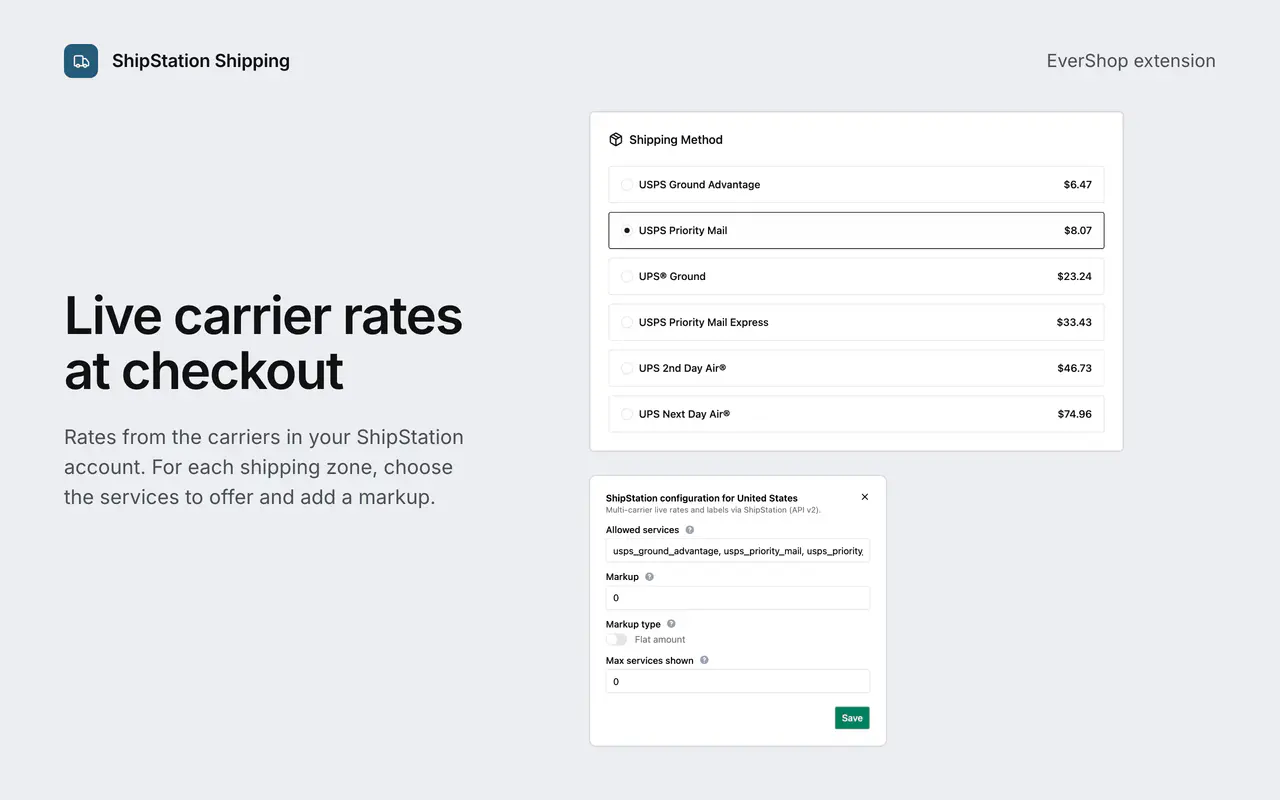
Overview
Live carrier rates from your ShipStation account at checkout, labels bought from the order page, and tracking that updates each order.
Works with EverShop 2.3.0 and later (tested on 2.3.0 and 2.4.0).
Features
- Live rates at checkout. Every carrier connected to your ShipStation account (USPS, UPS, FedEx and others) quotes the cart's weight and package size. Each service is one shipping method, priced with every charge ShipStation lists, fuel surcharges included, for your own box.
- Your services, your markup. For each shipping zone, choose the services to offer, add a flat or percentage markup, or show only the cheapest few.
- Labels from the order page. Create a shipment with the carrier ShipStation and the label is bought for the service the customer chose. The 4x6 PDF, the tracking number and the carrier's tracking link are saved on the shipment.
- Void and cancel safely. Void Label voids the label at ShipStation. Canceling a shipment voids its label first. If ShipStation will not void it (the label was used, or is past its void period), the shipment stays as it is and the admin shows the reason. The order's activity says what happened to the postage.
- Tracking on the order. With live tracking on, ShipStation tells your store when a package moves; without it, the store checks open shipments every 4 hours. Each new status (In Transit, Delivered, Exception, ...) is written on the order, and Delivered sends EverShop's delivery email.
- One key to set, applied without a restart.
Requirements
- EverShop 2.3.0 or later.
- A ShipStation account with API access and at least one connected carrier.
- The store's cron jobs running (they do, with
npm run start), for the tracking checks. - For live tracking only: the store at a public https address.
- Prices in the store's currency: ShipStation rates in another currency are not offered.
Install
On EverShop Cloud, choose Install on the item page. ShipStation then appears under Settings → Shipping Providers. Follow Configuration below.
On your own server, download the package from your order, then run this from your store's folder:
npm install ./evershop-shipstation-<version>.tgzAdd the extension to config/default.json:
{
  "system": {
    "extensions": [
      {
        "name": "shipstation",
        "resolve": "node_modules/@evershop/shipstation",
        "enabled": true,
        "priority": 10
      }
    ]
  }
}
Then build and restart your store: npm run build, then npm run start. Build again after each update of this extension.
Configuration
1. The API key. Open Settings → Shipping Providers in the admin, paste your ShipStation API key in the ShipStation card, and save. Then click Test Connection: it lists the carriers of your account.
- A ShipStation API account: the key is in the API dashboard, under API keys.
- A ShipStation account: Settings → API Settings, the V2 API key.
The key can also come from the SHIPSTATION_API_KEY environment variable; a key saved in the admin comes first.
2. Your store address and packages. Rates and labels are sent from the store address and phone number under Settings → Store. A product's weight and its package (Settings → Shipping, Packages) give the parcel's weight and size.
3. A shipping zone. Under Settings → Shipping, attach the ShipStation provider to a zone. Its Configure button has these options:
- Allowed services: the service codes to offer, separated by commas. Empty offers every service.
- Markup: added to every rate, as a flat amount in the store's currency or as a percentage (Markup type).
- Max services shown: only the N cheapest services. 0 shows all.
Common service codes:
- USPS:
usps_ground_advantage,usps_priority_mail,usps_priority_mail_express,usps_media_mail,usps_parcel_select - UPS:
ups_ground,ups_3_day_select,ups_2nd_day_air,ups_2nd_day_air_am,ups_next_day_air_saver,ups_next_day_air,ups_next_day_air_early_am - FedEx:
fedex_ground,fedex_home_delivery,fedex_express_saver,fedex_2day,fedex_standard_overnight,fedex_priority_overnight
USPS Media Mail is only for books and media: leave usps_media_mail out of the list unless you sell them.
4. Live tracking (optional). Click Enable live tracking in the ShipStation card. ShipStation then calls your store when a package moves. It needs the store's public https address (EVERSHOP_HOME_URL, or shop.homeUrl in the config). Clicking it again changes nothing; each store on the same ShipStation account gets its own webhook.
Shipping orders
On the order page, click Create shipment, keep the carrier ShipStation, and leave the tracking number empty. The label is bought for the service the customer chose at checkout. Print Label opens the PDF; Void Label voids it. Cancel shipment voids the label first.
ShipStation may refuse to void a label in the first seconds after it is bought: if so, try again a minute later.
Good to know
- Each rate quote at checkout creates a pending shipment in your ShipStation account (that is how ShipStation prices a parcel). Quotes are kept for 15 minutes, so a customer's checkout usually makes one, not one per click.
- Shipments older than 90 days, delivered or canceled are no longer checked for tracking.
- Store pickup scheduling is not available in this version.
Testing
A ShipStation API account has a sandbox key (it starts with TEST_). With it, labels are free samples marked "do not mail". The sandbox does not track packages, so tracking statuses only appear with a production key.
Highlights
Live rates at checkout
The carriers in your ShipStation account quote the cart's weight and box, and the customer picks the service.
Your services, your markup
For each shipping zone, choose the services to offer, add a flat or percentage markup, or show only the cheapest few.
Labels from the order page
Create a shipment and the label is bought for the service the customer chose: a 4x6 PDF to print, with the tracking number and link saved.
Void and cancel safely
Void a label from the order page. Canceling a shipment voids its label first; if ShipStation refuses, nothing changes and you see why.
Tracking on the order
ShipStation tells your store when a package moves, or the store checks every 4 hours. Each new status is written on the order.
One key to set
Paste your ShipStation API key under Settings, Shipping Providers, and click Test Connection.
Requirements
- EverShop 2.x
- Third-party account
- API key
- Cron enabled
Be the first to review this product
Write a review
Please log in to share your review of this product.
Changelog
- First release. Works with EverShop 2.3.0 and later (tested on 2.3.0 and 2.4.0).
- ### Added
- **Live rates at checkout.** One shipping provider, ShipStation, quotes every carrier connected to your ShipStation account (USPS, UPS, FedEx and others) for the cart's weight and package size. Each service is one shipping method, priced with every charge ShipStation lists (UPS fuel surcharges included), for your own box (never a carrier's flat-rate envelope). Quotes are kept for 15 minutes, so choosing a method is quick.
- **Per-zone options.** When you attach ShipStation to a shipping zone: the services to offer, a flat or percentage markup, and a limit on how many of the cheapest services are shown.
- **Labels from the order page.** Create a shipment with the carrier ShipStation and no tracking number: the label is bought for the service the customer chose, with your package's size and weight. The 4x6 PDF, the tracking number and the carrier's tracking link are saved on the shipment.
- **Void and cancel.** Void Label voids the label at ShipStation. Canceling a shipment voids its label first; a label ShipStation will not void (used, or past its void period) blocks the cancel with the reason, and the order says what happened to the postage.
- **Tracking.** Enable live tracking registers your store with ShipStation, which then tells the store when a package moves; without it, the store checks open shipments every 4 hours. Only status changes are written on the order. The tracking webhook needs a secret the extension creates, and the status is always read again from ShipStation.
- **Settings.** The API key under Settings → Shipping Providers (or `SHIPSTATION_API_KEY`), and a Test Connection button that lists your carriers.
ShipStation Shipping
v1.0.0Live USPS, UPS and FedEx rates from your ShipStation account at checkout, labels from the order page, and tracking that updates each order.
Self-hosted
Download the extension for your own EverShop installation.
Free
Download from your orders — always the latest version.
- Version
- 1.0.0
- Last updated
- 2026-11-22
- Category
- Extensions
- Type
- Extension
- Compatibility
- EverShop 2.x
- Package
- @evershop/shipstation