
Klaviyo Email Marketing
v0.1.1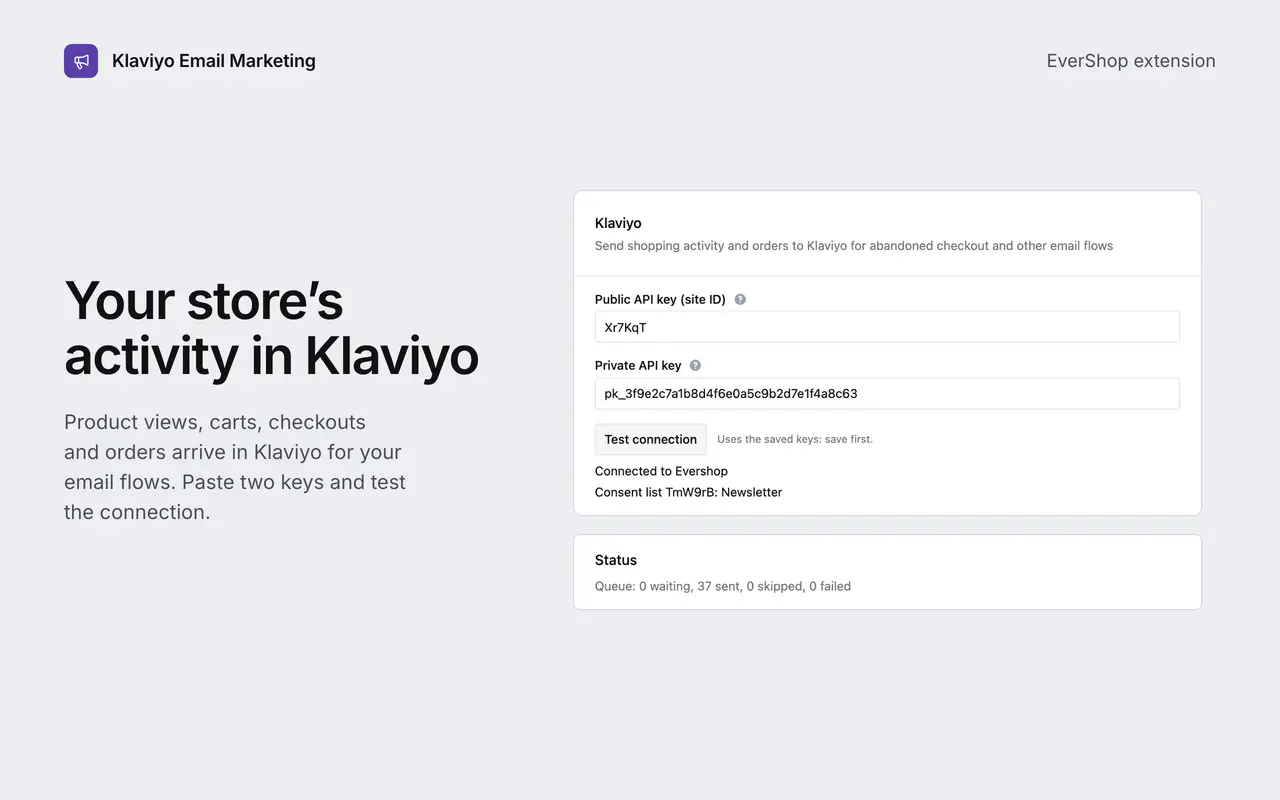
Overview
Send your store's shopping activity and orders to Klaviyo, and run abandoned checkout, browse abandonment, post-purchase and other email flows there. Optional boxes at checkout and on the registration form add shoppers to your Klaviyo lists.
You need a Klaviyo account. This extension is free; Klaviyo bills its own plans.
What you get
- Abandoned checkout emails that bring the cart back. Started Checkout reaches Klaviyo with a link that puts the shopper's items back in their cart, in any browser.
- Every order in Klaviyo. Placed Order and Ordered Product, then Fulfilled, Canceled and Refunded Order. Your server sends them, so ad blockers cannot stop them, and they are sent again when Klaviyo is busy.
- Browsing from the storefront. klaviyo.js records product views and cart adds, and shows your Klaviyo sign-up forms.
- Email and SMS sign-ups. Unticked boxes under the email at checkout, and an email box on the registration form, subscribe shoppers to your Klaviyo lists.
- Privacy options. Load Klaviyo only after the shopper consents, and choose whether guests are identified at checkout.
What Klaviyo receives
- Active on Site, from the browser (klaviyo.js): every page, automatically.
- Viewed Product, from the browser: a product page opens, or the shopper picks another variant.
- Added to Cart, from the browser: a product is added, or a quantity goes up.
- Started Checkout, from the server: a signed-in customer opens the checkout page, or a guest enters their email there. Sent 5 minutes later, with a link that restores the cart.
- Placed Order and Ordered Product, from the server: the payment method marks the order placed.
- Fulfilled Order, from the server: the whole order has shipped.
- Canceled Order, from the server: a placed order is canceled.
- Refunded Order, from the server: the refunds of a placed order reach the amount paid.
Server events always arrive, ad blockers included. Browser events of a shopper Klaviyo does not know yet are kept in their browser and given to the first profile that browser is identified as (Klaviyo's anonymous backfill, see Privacy and consent below).
Event values differ: Started Checkout and the order events carry the grand total (shipping and tax included). Added to Cart carries the cart's items after discount, without shipping or tax, as core's browser events count it (in a store whose prices include tax, with tax until the shopper gives an address). Keep it in mind when a flow or segment filters on value.
Requirements
- EverShop 2.4.0 or later. This extension uses core's
markOrderPlaced,cart_email_added, cart recovery link and browser commerce events, which came in 2.4.0. It does not run on 2.3.0. - A Klaviyo account, with a public and a private API key (see Set up).
- Nothing to set for the cart link. EverShop signs it with the
CART_RECOVERY_TOKEN_SECRETenvironment variable. When the store sets none (on EverShop Cloud a merchant cannot), this extension creates a secret on the first start and keeps it in the store's database, in the settingcartRecoveryTokenSecret. ACART_RECOVERY_TOKEN_SECRETthat is set wins. Switching from one to the other later cancels the cart links already emailed. Optionallycheckout.cartRecovery.ttlDaysin the config (default 30 days). - https. On an
http://page, klaviyo.js callshttp://a.klaviyo.com, which redirects and is refused, so no shopper is identified and no browser event is kept. - On your own server: Node.js 20.11 or later.
Install
On EverShop Cloud, choose Install on the item page. The extension is added to your site, and Klaviyo appears under Settings. Then follow Set up below.
On your own server, download the package from your order, then run this from your store's folder:
mkdir -p extensions/klaviyo
tar -xzf evershop-klaviyo-<version>.tgz -C extensions/klaviyo --strip-components=1
Add the extension to config/default.json:
{
  "system": {
    "extensions": [
      {
        "name": "klaviyo",
        "resolve": "extensions/klaviyo",
        "enabled": true,
        "priority": 20
      }
    ]
  }
}
Then build and restart your store: npm run build, then npm run start. The build adds the admin page and the storefront scripts; without it the settings page fails and klaviyo.js never loads. Build again after each update of this extension, and after enabling or disabling it. (npm run dev needs no build.)
The first start creates three tables: klaviyo_queue, klaviyo_consent and klaviyo_customer_consent.
Remove any other Klaviyo snippet from your theme or tag manager: this extension loads klaviyo.js itself. It leaves one that is already on the page alone, but two setups would send events twice.
Set up
1. Create the keys in Klaviyo
In Klaviyo, open Settings → API keys:
- Copy the public API key (the 6-character site ID).
- Create a private API key with these scopes: Events: Full Access and Accounts: Read Access. For the consent boxes, also Lists, Profiles and Subscriptions: Full Access (see Email and SMS consent at checkout). A key's scopes cannot be changed later, so give it all the ones you will use.
Keep the private key as secret as a password. Full Access includes reading: whoever has the key can read every event in your Klaviyo account, with the names, addresses and phone numbers of your orders, and send events in your store's name. EverShop admins can see a key saved on the settings page; one in the config is never shown. If it leaks, delete it in Klaviyo and create a new one.
2. Connect your store
In EverShop admin, open Settings → Klaviyo, paste both keys, save, and click Test connection. It shows your Klaviyo account's name, and warns when the key cannot send events or the public key belongs to another account.
- Wait a second between two tests: Klaviyo allows one account read per second.
- The private key can come from the config instead (
system.klaviyo.privateKey), which takes precedence.
3. Map the metrics in Klaviyo
In Klaviyo, open Analytics → Metrics → Edit mapped metrics, and map Revenue to Placed Order, Ordered product to Ordered Product and Started checkout to Started Checkout, with EverShop's metrics (source: API). Benchmarks, predicted customer lifetime value and A/B test revenue use this mapping.
4. Check the Status box
The Status box on the settings page warns when the private key is not valid or the cart link is off (no CART_RECOVERY_TOKEN_SECRET, and the database could not keep the extension's own secret at start: see the store's log), shows the latest error, and counts the queue.
Build the abandoned checkout flow
In Klaviyo, create a flow triggered by the metric Started Checkout, then:
- Trigger re-entry: keep the default, Re-enter whenever they re-qualify ("Allow re-entry"). Do not add the old "Has not been in this flow" filter either. Each new version of the cart starts the flow again; with re-entry blocked, a shopper who changes the cart gets no reminder at all. Limit how often a person is emailed with Smart Sending instead.
- First flow filter: "Placed Order zero times since starting this flow". A buyer gets no reminder.
- Second flow filter: "Started Checkout zero times since starting this flow". When the cart changes, the shopper gets one reminder with the newest cart, not one per version.
- The button: link it to
{{ event.CheckoutURL }}. It opens a page in your store that shows the cart's items and a button that puts them back in the shopper's cart, in any browser. - The items:
{{ event.Items }}holds each line'sProductName,Quantity,ItemPrice,RowTotal(price × quantity, before discount),ProductURLandImageURL. When your prices include tax, the prices include tax, as the shopper saw them. - The name: a guest's profile has the email only (see Privacy and consent). Write greetings with a fallback, such as
{{ first_name|default:'there' }}.
Things to know:
- The cart link works once and for 30 days. Every email of the flow carries the same link; after the first click, the page says the cart was already restored.
- Once an order is made from the cart, EverShop closes the cart, so the link stops working while the payment is open. When the payment is abandoned (a PayPal window closed, a 3-D Secure check left), the payment method cancels the order later (Stripe after 1 hour, PayPal after 6 hours) and EverShop gives the cart back: the link works again, and this extension sends the Started Checkout it could not send while the order was open. An order that is still being paid (a bank debit can take days) keeps its cart closed and gets no reminder.
- A shopper who buys within the 5 minutes still gets their Started Checkout, sent as history (
backfill): it counts in Klaviyo's reports but starts no flow, so a buyer never gets an abandoned-checkout email. - A shopper who comes back with exactly the same cart and email gets no second Started Checkout; a changed cart does.
- Build abandoned-cart flows on Started Checkout, not Added to Cart: Added to Cart comes from the browser, which cannot make the restore link, so its
CheckoutURLis just your cart page. - Each new version of the cart restarts the flow's wait, so the reminder goes out after the shopper's last change.
Shipping, cancellation and refund emails
- Fulfilled Order is sent once every item that needs shipping has shipped (with several shipments, when the last one ships), whatever the "notify customer" box said.
- Canceled Order is sent when a placed order is canceled. The reason typed in EverShop admin is in
{{ event.Reason }}: write it for the customer if your email shows it. - Refunded Order is sent when the refunds reach the amount paid: one full refund, or the last of several partial ones. Partial refunds are not sent on their own (Klaviyo keeps one Refunded Order per order).
- All three carry the Placed Order's items, addresses and value, and its
unique_id, so Klaviyo can count a canceled or refunded order against it in customer lifetime value. An order placed before you installed this extension gets them too.
EverShop sends its own shipment, delivery, cancellation and refund emails. If you build these emails in Klaviyo, turn EverShop's off in config/default.json, or the customer gets two:
{ "system": { "notification_emails": { "shipment_created": { "enabled": false } } } }The others are shipment_delivered, order_canceled and order_refunded.
Email and SMS consent at checkout
Two optional boxes under the email at checkout, unchecked until the shopper ticks them. A shopper who ticks one is subscribed to a Klaviyo list when the order is placed. The email box is also on the registration form, and a signed-in customer's email box works as an account setting (see below).
- In Klaviyo, pick or create the list (one list can take both boxes) and copy its list ID from the list's settings. The list decides single or double opt-in: with double opt-in, Klaviyo first sends a confirmation.
- The private key needs three more scopes: Lists, Profiles and Subscriptions (Full Access), besides Events and Accounts. A key's scopes cannot be changed: create a new key and paste it.
- In EverShop admin, open Settings → Klaviyo → Consent at checkout: turn on the email box, the SMS box or both, and enter the list IDs. The labels are optional (empty: "Email me with news and offers", "Text me with news and offers", in English; type your own in your store's language). The SMS box needs the disclosure text shown under it: use the wording Klaviyo recommends for your country. SMS also needs SMS set up in your Klaviyo account.
- Save, then click Test connection: it checks that each list exists and that the key can use lists.
How it works:
- A box shows only when it can work: on, with a list ID (the SMS box also with its disclosure), and a valid private key.
- Each tick is saved for the shopper's cart at once (a reload keeps it), and sent when the order is placed, with the source "EverShop checkout". A checkout left before the order sends nothing.
- Only a tick is sent: unticking, or never ticking, unsubscribes nobody. A tick subscribes again a profile that had unsubscribed (Klaviyo clears the suppression, because the shopper asked again).
- SMS is sent only when the order's billing phone has its country code (EverShop saves checkout phones that way); never the shipping phone, which may be a gift recipient's.
- A guest's email and phone are subscribed as two profiles: anyone can check out with anyone's email, so a guest's phone never goes onto that person's profile. A customer's own order (its email is the account's) puts both onto their profile.
- With a key that lacks the new scopes, the subscriptions are retried for about 15 hours and then fail; the Status box shows the error, and Send failed events again sends them once the key is fixed. Events keep going meanwhile.
- "Sent" means Klaviyo accepted the request. A profile Klaviyo then refuses (SMS not set up, a phone that belongs to another profile) is not reported back to EverShop: check the list in Klaviyo.
- Klaviyo accounts that age-gate SMS (a date of birth with each SMS consent) are not supported.
The email box on the registration form and for signed-in customers:
- When the checkout email box is on, the registration form shows it too (unticked, same label and list), above the Sign Up button. A tick is saved on the new account and sent at once, with the source "EverShop sign-up". An admin creating a customer cannot consent for them.
- For a signed-in customer, the checkout email box shows the account's choice: ticked if they ticked it when signing up or at an earlier checkout. A change is saved on the account and sent at once, without waiting for an order: ticking subscribes them to the list; unticking unsubscribes them from all marketing emails in Klaviyo (Klaviyo's Unsubscribe Profiles, with no list). Withdrawing consent has to be as easy as giving it.
- Only a change is sent. A box shown ticked because of the account sends nothing by itself.
- The choice is kept in the extension's table
klaviyo_customer_consent, one row per account, and is deleted with the account. A customer who unsubscribes through the link in a Klaviyo email is not reported back to EverShop: their account still says yes, and the box still shows ticked. - The SMS box stays per order, as for guests (the registration form has no phone).
Klaviyo sign-up forms
- Klaviyo's pop-up and flyout forms appear on every page where klaviyo.js loads, the checkout page included. In each form's targeting, hide it on URLs that contain
/checkout, so it never interrupts a buyer. - An embedded form needs a place on the page. In a Text block of the page builder, or in a CMS page, add a Raw HTML block with
<div class="klaviyo-form-YOUR_FORM_ID"></div>(the form's embed code in Klaviyo shows the ID); klaviyo.js fills it in. - With the consent mode "Only after the shopper consents", forms appear only after the shopper consents.
Privacy and consent
- Orders are always sent, guests' included, with the names, phone and addresses in the event (
BillingAddress,ShippingAddress). A guest's profile gets the email only: anyone can check out with anyone's email, so a guest order must not change that person's name or phone in Klaviyo. A customer's own order (its email is the account's) gives their profile the account name, the billing phone and the billing address as location. - Identify guests at checkout (on by default): a guest who enters their email at checkout is identified in the browser and gets Started Checkout before they order. The browser waits until the email has settled (a shipping method or the order is submitted, or the page is left), so a typo fixed in the meantime never gets the shopper's browsing. Turn it off if your policy needs consent first: abandoned-checkout emails then reach signed-in customers only. Whether Klaviyo actually emails someone also depends on their consent status in Klaviyo and on your flow settings.
- Anonymous backfill: with Klaviyo's Anonymous backfill on (Settings → Data → Tracking, on in new accounts), klaviyo.js keeps a visitor's product views and cart adds in the browser's local storage, readable by other scripts on the page, and sends them, with their original times, to the first profile the browser is identified as. Mention it in your privacy notice, or turn the setting off in Klaviyo.
- Shared computers: signing out does not make klaviyo.js forget the customer; the next visitor's browsing is recorded on that profile until someone else is identified. Klaviyo documents no way to reset it.
- Data kept in the store: the queue keeps an order's event until it is sent (then only its key), and deletes every row 30 days after it finished. A cart's consent choice (two yes/no values) is kept until its order is placed, the cart is deleted, or 30 days pass.
- Anyone can enter any email at checkout, so anyone can create profiles and abandoned-checkout emails for an address, within core's API rate limit, and with Identify guests at checkout on, that browser's browsing goes onto that person's profile (never their name or phone).
Load Klaviyo only after consent: choose "Only after the shopper consents" in the settings, then let your consent tool do one of these when the shopper agrees to marketing cookies, on every page load (both work at any time, even before the page is ready):
window.evershopKlaviyoConsent = true;
window.dispatchEvent(new Event('evershop:klaviyo-consent'));- Nothing of Klaviyo loads before consent, sign-up forms included. When a shopper withdraws consent, stop setting the flag: Klaviyo is not loaded from the next page on (its cookies stay until they expire).
- The server events (Started Checkout, orders) do not depend on the browser's consent.
Delivery and retries
The server events go through a queue table, klaviyo_queue, sent every minute by the cron job klaviyoProcessQueue (a run never starts while the last one is still going).
- A 429 or a server error at Klaviyo, a network error, or a rejected key is retried after 1, 5, 30, 120 and 720 minutes (plus up to 20 %), or later when Klaviyo's
Retry-Afterasks for longer. After the 6th attempt the row isfailed. - A 429 or a rejected key (401, 403) also stops the run: the rows not sent yet wait without losing an attempt.
- Any other error from Klaviyo (a 4xx, the event itself is wrong) fails the row at once.
last_errorholds Klaviyo's message. - Late events start no flow: Klaviyo starts no flow for an event that arrives 6 hours or more after it happened. A retried Placed Order that late still counts in reports; a Started Checkout that late is sent as history.
- After you fix a key, click Send failed events again on the settings page: every failed row is sent again. A Started Checkout whose cart was ordered since is skipped.
- A Started Checkout that must not go out (the cart was emptied, ordered and not paid, or already sent with the same items) is
skipped, with the reason inlast_error. done,skippedandfailedrows are deleted after 30 days.- Without a valid private key nothing is queued or sent, so orders placed in that time never reach Klaviyo. Rows already waiting stay, and go out when a key returns: change the key to another Klaviyo account only once the queue is empty.
Testing
- Klaviyo drops profiles at
@example.comand@test.com: use real-looking addresses. - Serve the store over https, even on your machine (see Requirements).
- klaviyo.js switches tracking off in a browser it takes for a robot (headless Chrome, automated browsers). Test the browser events in a normal browser, or make the test browser look like one.
- Klaviyo has no separate sandbox host. Create a test account: sign up again with the same email and password and another company name. Klaviyo can convert it to a test account (Account → Testing), which cannot be undone without Klaviyo's support; a test account is still billed.
Remove the extension
- In Klaviyo, delete the private key (Settings → API keys).
- Uninstall the extension. On your own server: disable or remove it in
config/default.json, then build and restart the store. - To delete its data as well, run this in the store's database. The last two lines remove the record of its migrations (without it, a reinstall would not create the tables again) and its settings, the private key included:
DROP TABLE klaviyo_queue;
DROP TABLE klaviyo_consent;
DROP TABLE klaviyo_customer_consent;
DELETE FROM migration WHERE module = 'klaviyo';
DELETE FROM setting WHERE name LIKE 'klaviyo%';
The cart link's secret (the setting cartRecoveryTokenSecret) stays. Delete it too (DELETE FROM setting WHERE name = 'cartRecoveryTokenSecret';) unless another extension sends cart links.
Limits
- The admin page is in English: EverShop cannot load translations from an extension yet.
- A payment method must call core's
markOrderPlaced, as core's COD, Stripe, PayPal and zero-total checkout do; otherwise its orders send no Placed Order. - Recently viewed product blocks, product recommendations, and price-drop and low-inventory flows need the product catalog in Klaviyo, which this version does not sync.
- Predicted customer lifetime value needs order history Klaviyo does not get from this version (no historical import): Klaviyo asks for 500 customers and 180 days of orders.
- Not in this version: a historical import of past orders, the product catalog, profile sync and back in stock.
For developers
- From the source folder: put it in your project's
extensions/klaviyoand runnpm run compileinside it. TypeScript checks the code against the EverShop installed in your project (a store made withcreate-evershop-apphas TypeScript).npm run typecheckonly checks. - The package declares
@evershop/evershop >=2.4.0as a peer dependency. - The cart link's secret:
services/cartLinkSecret.ts(the bootstrap puts the stored value intoCART_RECOVERY_TOKEN_SECRETwhen the store sets none; core reads the variable on every call). KLAVIYO_API_BASE_URL(environment) sends the server calls to another host, such as a fake Klaviyo on your machine, so you can test the whole flow without sending anything to Klaviyo. It must be https, or http on localhost, and the settings page shows it while it is set.- Unit tests:
src/tests/unit, written for Jest 29 (ESM,--experimental-vm-modules) with jsdom.npm run compiledoes not build them. They run from the project root (they find EverShop innode_modules/@evershop/evershop), and the queue test needs a Postgres server (it skips itself without one).
Highlights
Abandoned checkouts that come back
Started Checkout reaches Klaviyo with a link that puts the shopper's items back in their cart, in any browser.
Every order, sent by your store
Placed Order, Ordered Product, and Fulfilled, Canceled and Refunded Order go from your server to Klaviyo, so ad blockers cannot stop them. They are sent again when Klaviyo is busy.
Browsing from the storefront
klaviyo.js records Active on Site, Viewed Product and Added to Cart, and shows your Klaviyo sign-up forms.
Email and SMS sign-ups
Unticked boxes under the email at checkout, and an email box on the registration form, subscribe shoppers to your Klaviyo lists. A signed-in customer can untick it to unsubscribe.
Privacy options
Load Klaviyo only after your consent tool says yes, and choose whether guests are identified at checkout.
Two keys to set
Paste your public and private API keys under Settings, Klaviyo, then click Test connection.
Requirements
- EverShop 2.x
- Third-party account
- API key
- Cron enabled
- SSL certificate
Be the first to review this product
Write a review
Please log in to share your review of this product.
Changelog
- ### Fixed
- Started Checkout's cart link works without `CART_RECOVERY_TOKEN_SECRET`, so on EverShop Cloud too, where a merchant
- cannot set environment variables. When the store sets none, the extension creates a secret on the first start and
- keeps it in the store's database (the setting `cartRecoveryTokenSecret`). A `CART_RECOVERY_TOKEN_SECRET` that is set
- still wins.
- ### Changed
- The Status box's cart link warning now shows only when no secret could be kept, and says why.
Klaviyo Email Marketing
v0.1.1Send product views, carts, checkouts and orders from EverShop to Klaviyo for abandoned-checkout and post-purchase flows, with email and SMS sign-ups.
Self-hosted
Download the extension for your own EverShop installation.
Free
Download from your orders — always the latest version.
- Version
- 0.1.1
- Last updated
- 2026-11-16
- Category
- Extensions
- Type
- Extension
- Compatibility
- EverShop 2.x
- Package
- @evershop/klaviyo